Getting your 10DLC campaign rejected feels confusing because the carrier feedback is often vague: “insufficient details,” “improper consent,” “noncompliant messaging,” or the dreaded “campaign denied — resubmit with corrections.” None of that tells you what actually went wrong.
Here’s the thing: carriers aren’t trying to be difficult. They’re trying to protect the messaging ecosystem from spam, fraud, and unclear business practices. When your 10DLC submission doesn’t give them enough clarity, they reject it, even if your intentions are legitimate. These enforcement principles are part of broader carrier commitments to messaging interoperability and industry best practices, as outlined by the CTIA.
This guide breaks down:
- How carriers evaluate campaigns
- The most common 10DLC rejection reasons
- How to fix each issue
- What compliant campaigns look like
- And how to avoid rejections moving forward
By the end, you’ll understand exactly why 10DLC campaigns fail and how to get yours approved on the first try.
How Carriers Review 10DLC Campaigns
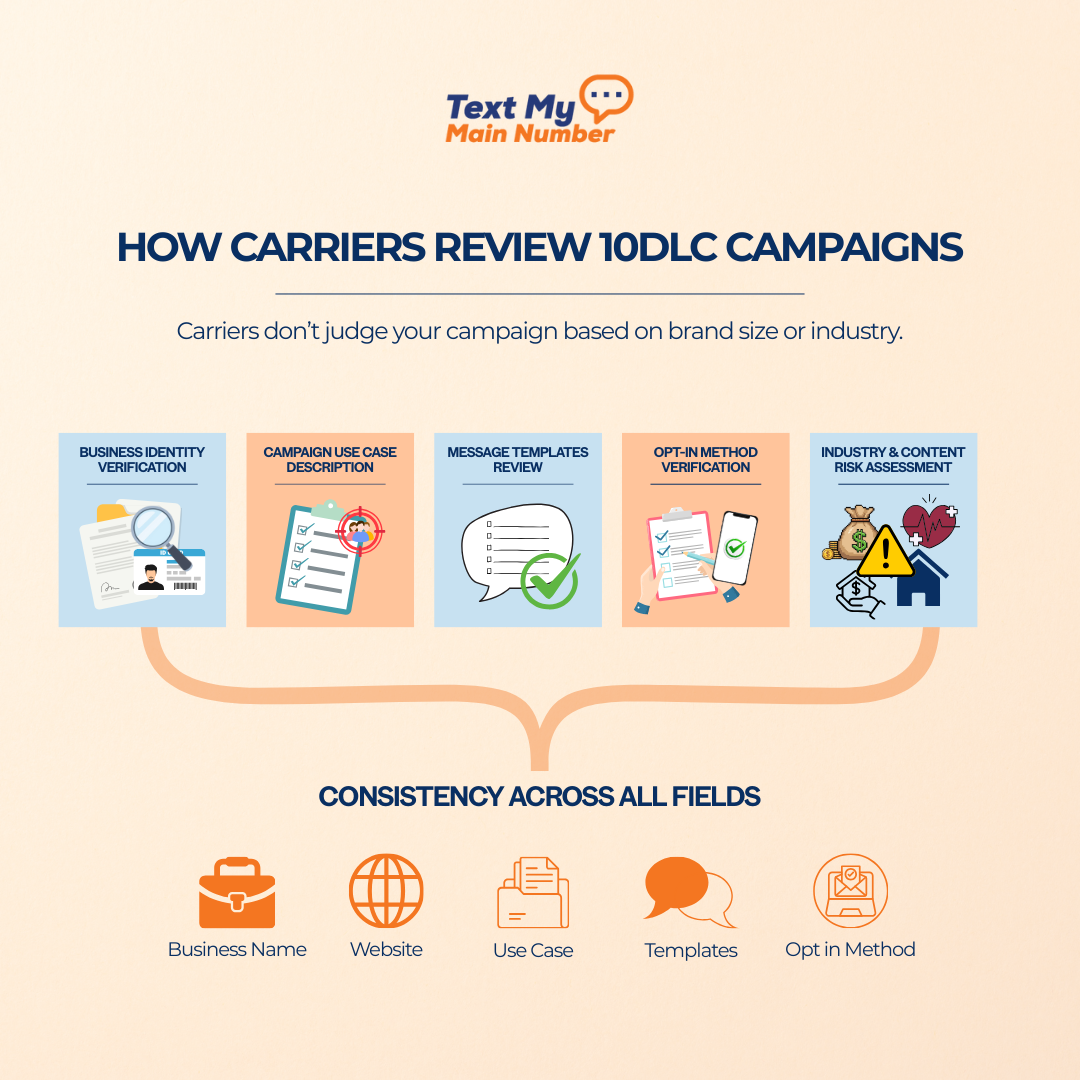
Carriers don’t judge your campaign based on brand size or industry. They judge it based on clarity, transparency, and risk. Their job is to prevent spam texts, unsafe content, misleading opt-ins, and unverified businesses from entering the messaging ecosystem.
To do that, they evaluate your submission through five lenses.
1. Business Identity Verification
The first thing carriers check is whether your business looks legitimate and consistent.
They’ll review:
- Your legal business name
- EIN and tax registration
- Website and domain ownership
- Business address and contact details
- Whether your website actually exists and matches your brand
If anything feels mismatched — name vs. URL, outdated website, placeholder text, missing About/Privacy pages — they will flag the campaign.
Carriers prefer:
- a complete website
- clear branding
- easy-to-find contact information
- a privacy policy explaining SMS use
If your brand doesn’t look “real,” approval slows or stalls.
2. Campaign Use Case Description
This is where many people get rejected.
Carriers don’t accept vague descriptions like:
- “We send alerts to customers.”
- “General customer communication.”
- “We message leads about our services.”
They want specificity:
- Who you message
- Why do you message them
- What types of messages do you send
- When those messages are triggered
- How those people opted in
If your description doesn’t give the reviewer enough clarity, the campaign fails immediately.
Think of this section as your chance to prove:
“Here is exactly what we send and to whom.”
The more concrete, the better.
3. Message Templates Review
Carriers inspect every template you submit.
They check for:
- consistency with your use case
- required opt-out language
- no prohibited content
- no misleading claims
- no URL shorteners (sometimes blocked)
- No templates that differ from your declared purpose
If any template feels promotional when your use case is “informational,” rejected.
If your template includes a link but your description never mentioned links, rejected.
If you forget "Reply STOP to opt out," rejected instantly.
This is one of the most common 10DLC rejection triggers.
4. Opt-In Method Verification
This is the PAA question: “Why was my 10DLC campaign rejected if people gave me their number?”
Because carriers need evidence of HOW they opted in. These requirements are reflected in FCC consent rules under the TCPA, which mandate clear, documented consent before sending automated or recurring text messages.
They look for:
- The exact page, form, or pop-up
- Checkbox language
- Text keyword opt-ins
- CRM forms that store consent
- Screenshots, URLs, and specific places where the consumer gave permission
If your opt-in description is vague (“Users opted in on our site”), the campaign fails.
Carriers want:
“You collect numbers here (URL). The form says this (exact wording). Users must consent before submitting.”
If you use shared leads, purchased lists, or data from unclear sources, carriers block the campaign immediately.
5. Industry & Content Risk Assessment
Some industries are marked “high-risk,” which means carriers apply stricter filters. If you operate in a regulated or higher-risk industry, A Comprehensive Guide to 10DLC Registration and Regulations explains how carrier rules, disclosures, and documentation affect approval decisions.
High-risk categories include:
- Real estate
- Financial services
- Healthcare
- Political campaigns
- Lead-generation
- Debt, credit repair, insurance
- Sweepstakes or offers
This doesn’t mean you can’t text — it means you must be extremely clear and compliant.
Carriers will check:
- whether you make claims
- whether opt-in is explicitly documented
- whether your templates match industry rules
- whether your website shows proper disclosures
If something feels even slightly risky or unclear, they reject the campaign for safety.
6. Consistency Across All Fields
Carriers review your entire submission as a single package.
They compare:
- Business name
- Website
- Use case
- Templates
- Opt-in method
- EIN registration
If anything contradicts something else, your 10DLC campaign fails.
Example:
Your use case says “appointment reminders,” but your templates include promotional offers → rejection.
Your business name says “ABC Holdings,” but your website shows “Bright Dental Spa” → rejection.
Carriers want alignment across the board.
If you’re new to the registration process, our full walkthrough on 10DLC Registration breaks down every step carriers require before approving a campaign. If you need a deeper understanding of the full approval workflow and required documentation, 10DLC Registration: Complete 2025 Guide for Small Business Texting explains the entire process step by step.
Common Reasons 10DLC Campaigns Are Rejected
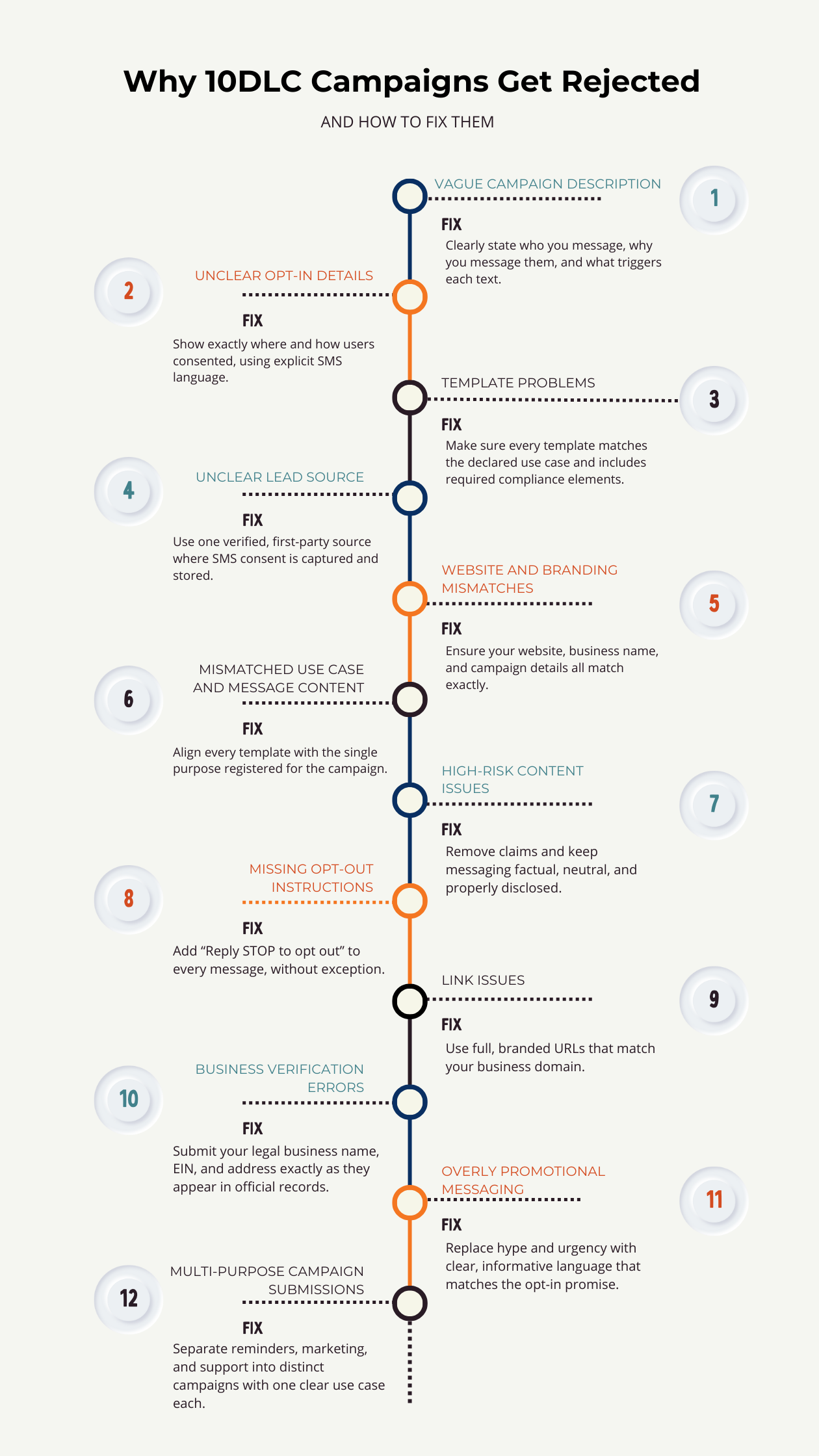
When a 10DLC campaign is rejected, the carrier rarely tells you the exact problem. You get generic notes like “insufficient description” or “improper consent,” which forces you to guess. But the truth is, rejections almost always fall into predictable patterns.
Let’s break down the most common 10DLC rejection reasons, why they happen, and what they actually mean behind the scenes.
1. Vague or Generic Campaign Descriptions
This is the number one failure point.
Carriers want to know exactly what kind of messages you’re sending. If your campaign description is even slightly vague, it gets rejected.
Examples that fail instantly:
- “We send alerts to our customers.”
- “General account communication.”
- “Updates and promotions.”
- “Customer notifications.”
These descriptions reveal nothing about:
- Who is receiving texts
- Why they’re receiving them
- What triggers the messages
- How they opted in
Carriers are not guessing your intentions. If they’re unsure, they reject.
2. Missing or Weak Opt-In Details
Carriers must see that subscribers clearly consented before receiving texts.
If you write something like:
- “Users opted in on our website.”
- “They signed up for SMS.”
…that’s too vague.
They want:
- the exact page where they opted in
- the exact wording used
- whether a checkbox was required
- whether the form explicitly mentioned SMS
- whether a STOP instruction was shown
If you cannot explain the opt-in in detail, the campaign fails.
Lead-gen forms without explicit SMS terms are one of the biggest 10DLC rejection triggers in the industry.
3. Message Templates Missing Required Components
Templates must be complete, compliant, and consistent with your use case.
Carriers reject templates when:
- They lack opt-out instructions
- They include content not described in the use case
- They include links never mentioned in the description
- They include prohibited words or claims
- The sender isn’t clearly identified
- The templates look promotional, but the campaign was registered as informational
Common template mistakes:
- Missing “Reply STOP to opt out.”
- Overly salesy phrases (“limited-time offer!!!”)
- Using link shorteners like bit.ly
- Adding emojis in high-risk industries
- Including message types not covered in the campaign description
If a single template is off, the entire campaign fails.
4. Unclear or Unverified Lead Sources
If carriers cannot confirm how you obtained phone numbers, they immediately reject.
High-risk submissions include:
- “We text leads from multiple partners.”
- “We purchased a list of interested customers.”
- “We collect numbers through various sources.”
Carriers want:
- one clear, verified source
- a documented opt-in trail
- evidence that the consumer knowingly gave permission
Lead purchasing is an automatic rejection.
5. Website or Branding Mismatch
Carriers review your website to verify your business identity.
Campaigns get rejected if:
- Your website looks incomplete or placeholder
- Your business name on the website doesn’t match the submission
- The domain looks suspicious or inactive
- There’s no Privacy Policy or Terms page
- SMS consent language isn’t publicly visible
If a carrier can’t validate that your business is real, they don’t approve your 10DLC campaign.
6. Mismatched Use Case and Templates
If your declared use case says:
- “appointment reminders,”
But your templates include: - “Special offer for new customers!”
…that’s a mismatch → automatic rejection.
Carriers do not allow blending of:
- reminders + marketing
- support + promotions
- alerts + lead generation
Each category requires its own campaign.
7. High-Risk or Restricted Content
Certain industries face stricter rules.
High-risk categories include:
- financial services
- healthcare
- real estate
- political messaging
- sweepstakes and contests
- insurance and debt relief
If your templates contain:
- medical claims
- financial promises
- discount-heavy promotions
- political fundraising
…without proper context and disclosures, your campaign will be rejected.
8. Missing Opt-Out Instructions
This is one of the most black-and-white rules.
If even one template lacks opt-out wording, such as:
- “Reply STOP to opt out.”
- “Text STOP to unsubscribe.”
…you fail.
Carriers consider opt-out instructions a non-negotiable safety feature. For a broader compliance overview covering consent, disclosures, and messaging rules, SMS Compliance in 2025: Your TCPA Text Message Compliance Checklist outlines what carriers and regulators expect.
9. Using URL Shorteners or Unapproved Link Formats
Some carriers reject:
- bit.ly
- tinyurl
- rebrand.ly
- unbranded tracking links
These are often used by spammers, so they’re red-flagged.
If your templates include shortened links, prepare for rejection.
10. Incorrect or Incomplete Business Verification
Your EIN, business name, and legal details must match public records.
Campaigns get rejected when:
- EIN doesn’t match IRS records
- The business name differs from the website
- The entity type is incorrect
- The address doesn’t match your filing
If verification fails, the carrier blocks the campaign before reviewing content.
11. Overly Promotional or Aggressive Messaging
Carriers are cautious about SMS marketing because it’s often abused.
Templates with:
- “BUY NOW!”
- “Act fast!”
- “Limited-time discount!!!”
- “Lowest price today!”
…are often rejected unless the campaign is explicitly registered as Marketing and supported by verifiable opt-ins.
Even then, high-pressure language increases scrutiny.
12. Multiple Use Cases Stuffed Into One Campaign
If you try to combine:
- reminders
- updates
- offers
- promotions
- customer support
…into one 10DLC campaign, it won’t be approved.
Carriers want a single, clean purpose for each campaign. Mixing purposes confuses the reviewer and triggers a denial.
How to Fix Each Type of Rejection
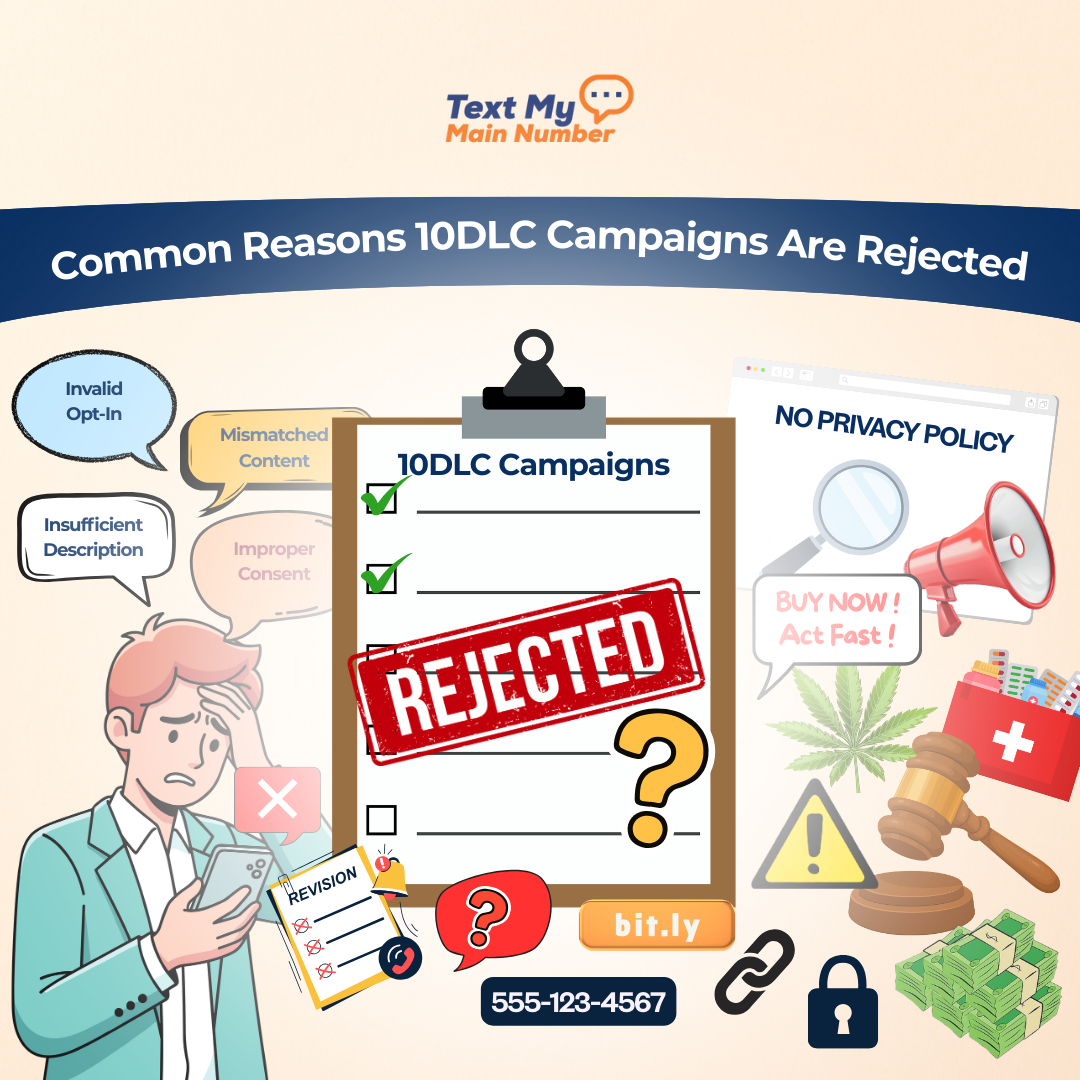
Most 10DLC rejections come down to clarity. Carriers aren’t guessing your intentions; they’re protecting the ecosystem. If anything feels vague, inconsistent, or potentially risky, they deny the campaign. The fixes are straightforward once you understand what reviewers need.
Let’s walk through each rejection type and the most effective way to correct it.
Fixing Vague Campaign Descriptions
If your description doesn’t explain who you message, why, and when, it gets flagged. Carriers want a simple, factual explanation of your workflow.
What works:
Spell out the exact sequence of communication.
Example:
“We send appointment reminders, confirmations, follow-ups, and reschedule notices to customers who opt in through our online booking form.”
No adjectives, no marketing language — just the truth. The more specific you are, the faster it gets approved.
Fixing Weak or Unclear Opt-In Details
This is one of the top 10DLC rejection reasons. Carriers want proof that users knowingly gave permission.
What to include:
- the exact URL of your form
- the exact wording shown near the phone field or checkbox
- whether the checkbox is required
- how keyword opt-ins work (if applicable)
- screenshots when possible
Acceptable phrasing:
“Users opt in on https://example.com/book. The form includes a mandatory SMS consent checkbox reading: ‘I agree to receive appointment updates and alerts via SMS. Reply STOP to unsubscribe.’”
This level of detail is what carriers expect.
Fixing Template Problems
Templates must match the declared use case and follow compliance rules. A single noncompliant template can sink the entire campaign.
Fixes include:
- add opt-out instructions (“Reply STOP to opt out”)
- identify your business in each message
- avoid link shorteners
- remove promotional language from non-marketing campaigns
- align the tone with the declared purpose
- fix capitalization, emojis, or risky phrasing
Templates should read like real examples a customer would receive — not placeholders.
Fixing Lead Source Issues
Carriers reject campaigns when the origin of your phone numbers is unclear. If the source cannot be verified or doesn’t explicitly include SMS consent, the campaign fails.
What carriers need:
- one clear source of leads
- how the user gave consent
- whether consent is stored
Example of a strong explanation:
“All contacts come from our website’s booking form. SMS consent is required via checkbox before submission, and timestamps are stored in our CRM.”
Anything involving purchased, rented, or shared lists is non-negotiable — those are automatic rejections.
Fixing Website and Branding Mismatches
Reviewers look at your online presence to confirm legitimacy. If your website looks incomplete or the branding doesn’t match your campaign, it raises flags.
Fixes include:
- update your website so your legal business name is visible
- add a Privacy Policy with SMS language
- publish Terms of Service
- ensure your domain matches the brand name used in the campaign
- avoid “coming soon” or half-built pages
Your digital footprint must look like a real business customers would trust.
Fixing Mismatched Use Case and Message Content
If you register the campaign as “appointment reminders” but include promotional templates, the campaign is denied. Carriers expect a clean and consistent relationship between what you say you send and what you actually submit.
Fix:
Make sure every template fits the stated use case. If you need to send both reminders and offers, create separate campaigns. One use case = one type of messaging.
Fixing High-Risk Content Issues
Financial, medical, real estate, insurance, and political campaigns require extra care. Claims, promises, or aggressive language will be rejected immediately.
How to correct it:
- remove guarantees or outcome-based language
- avoid pressure-driven marketing terms
- Keep the tone neutral and informational
- include disclaimers when appropriate
- Ensure opt-in clearly disclosed the nature of messages
High-risk industries pass when the content is honest and unembellished.
Fixing Missing Opt-Out Instructions
This is the easiest fix but one of the most common rejection triggers.
Solution:
Add “Reply STOP to opt out” to every message template — even support or transactional ones. Carriers will not approve a campaign without it.
Fixing Link Issues
Shortened or unrecognized URLs are often flagged because they’re common in spam.
Fixes:
- use full, branded URLs
- avoid bit.ly, tinyurl, and other unapproved shorteners
- make sure the domain matches your business name
A clean URL signals legitimacy.
Fixing Business Verification Errors
If your EIN doesn’t match IRS records or your business name isn’t standardized, your registration stalls before templates are even reviewed.
What to check:
- legal business name exactly as it appears in IRS records
- correct EIN or tax ID
- matching address across all submitted fields
- consistent naming across website, forms, and business filings
Simplify everything — one brand, one identity, one set of details.
Fixing Overly Promotional Messaging
Even approved marketing campaigns can’t include spam-like language. If your templates read like an ad blast, carriers will deny them.
Fix the tone by:
- reducing urgency (“BUY NOW”)
- avoiding extreme punctuation
- focusing on clarity instead of hype
- including opt-out instructions
- matching the promised messaging style in your opt-in
Keep messages clear, calm, and direct.
Fixing Multi-Purpose Campaign Submissions
If you try to combine reminders, marketing, support, and alerts in one campaign, carriers will reject it.
Fix:
Break your communication into separate campaigns. Carriers approve single-purpose campaigns far more efficiently because they’re easier to evaluate and trust.
Examples of Acceptable 10DLC Campaign Use Cases
Carriers approve campaigns quickly when the purpose is crystal clear and the opt-in aligns with the message flow. The common thread across all successful campaigns is predictability: a defined audience, a defined reason for messaging, and templates that match the stated intent.
Appointment and Scheduling Workflows
These are some of the easiest campaigns to approve because the user directly requests the communication. Think real estate showings, dental appointments, spa bookings, fitness consultations, or home service visits.
The content is simple:
- confirmations
- reminders
- reschedule notices
- follow-ups
As long as the opt-in happens during booking and the templates stay within that scope, carriers approve these with minimal friction.
Order Status and Delivery Updates
This category consistently passes because it’s tied to a transaction the customer initiated.
Typical messages include:
- order confirmations
- shipping updates
- delivery notifications
- delay alerts
These are considered low-risk because they’re purely informational. The only requirements are proper sender identification and opt-out language.
Customer Support Messaging
Two-way support campaigns are approved when the templates clearly reflect assistance rather than promotion. Carriers expect content such as:
- answers to customer questions
- ticket updates
- issue-resolution messages
- links to help articles
The critical rule: support is support. No sliding discounts or offers into these templates.
Marketing Messages With Proper Opt-In
Marketing isn’t the problem — unclear consent is. Carriers approve marketing workflows when the opt-in explicitly states that the user is subscribing to promotional SMS.
Acceptable examples include:
- loyalty program updates
- weekly or monthly offers
- product announcements
- event promotions
Templates must be calm, clear, and compliant. Avoid hype-driven language and provide a straightforward opt-out line.
Service and Account Notifications
Renewals, policy updates, subscription reminders, payment alerts, and maintenance notices are all considered standard informational use cases.
These pass easily when:
- The opt-in was captured during account creation
- templates match the service-focused nature of the campaign
- No marketing content is mixed in
Internal Alerts
If your messages go to employees or internal staff, carriers treat the campaign as extremely low risk.
Typical uses:
- shift reminders
- scheduling changes
- internal announcements
- operational updates
These campaigns pass quickly as long as they’re clearly defined and not mixed with consumer communications.
Best Practices to Avoid 10DLC Rejections in 2026
- Use one clear purpose per campaign. Don’t mix reminders, support, and promotions under a single use case.
- Write a concise, plain-language description of what you send, to whom, and when. No marketing language, no vagueness.
- Show the exact opt-in method, including URL, checkbox text, keyword instructions, and whether consent is mandatory.
- Keep templates tightly aligned with your declared use case; if it isn’t mentioned in the description, don’t include it in the templates.
- Add “Reply STOP to opt out” to every message template, even for transactional or internal flows.
- Avoid link shorteners and use branded, full URLs that match your business domain.
- Ensure your business name, EIN, website, and campaign submission all match exactly — consistency is critical.
- Build a complete website with a visible Privacy Policy and Terms of Service, including SMS usage language.
- Store proof of opt-in in your CRM with timestamps; carriers may request verification during appeal reviews.
- Keep promotional language calm and factual. If your opt-in wasn’t explicitly for marketing, avoid sales-driven messaging entirely.
- Don’t use purchased or shared leads under any circumstance; carriers reject these automatically.
- For high-risk industries (finance, healthcare, real estate, weight loss, insurance), keep templates neutral and avoid claims or guarantees.
- Refresh your opt-in language annually to match evolving carrier requirements and eliminate ambiguity.
- Submit separate campaigns if you need to cover different message types; multiple approvals are better than one overloaded campaign.
- Test templates internally for clarity — if a carrier reviewer can’t understand your intent in under ten seconds, rephrase it.
Final Thoughts
10DLC isn’t complicated once you understand how carriers think. They’re not blocking businesses—they’re blocking uncertainty. When your campaign shows who you’re messaging, why you’re messaging them, and how those people opted in, approval becomes straightforward.
The real problem is that most submissions are too vague, too broad, or too inconsistent to pass on the first try.
If you follow the structure laid out in this guide—clear use case, clean templates, documented opt-in, and consistent business details—you remove the guesswork. Your campaigns get approved faster, your deliverability improves, and your customers actually receive the messages you send.
This is where Text My Main Number makes your life easier. You get guided 10DLC onboarding, compliant templates, transparent opt-in tools, and a unified inbox all in one place. Instead of wrestling with carrier rules, you get approved and get back to running your business.
Start your 14-day free trial and see how much smoother business texting feels when compliance is handled the right way.

.svg)