


A CRM helps you know the account. Customer memory helps you recognize how that account prefers to work.
Those functions overlap, but they are not interchangeable. A CRM usually manages contacts, companies, quotes, opportunities, scheduled work, sales stages, and completed activity. 10DLC Registration: Complete 2025 Guide for Small Business Texting explains how evolving communication regulations impact how businesses manage contact data within CRMs, highlighting the need for clear operational structures alongside commercial records.
Customer memory covers the recurring preferences and practical arrangements that shape how employees serve an established customer.
This is not an argument for replacing a CRM. It is a way to assign different kinds of information to the right job.
That distinction matters more as a company grows. When several employees interact with the same account, knowing who the customer is does not always tell them how routine decisions have been handled before. The team may have accurate commercial data while still relying on individual employees to remember approval habits, packaging choices, access arrangements, or preferred communication channels.
Understanding customer memory vs CRM helps an operator decide what belongs in a formal account record, what deserves a durable team reference, and how the two can work together.
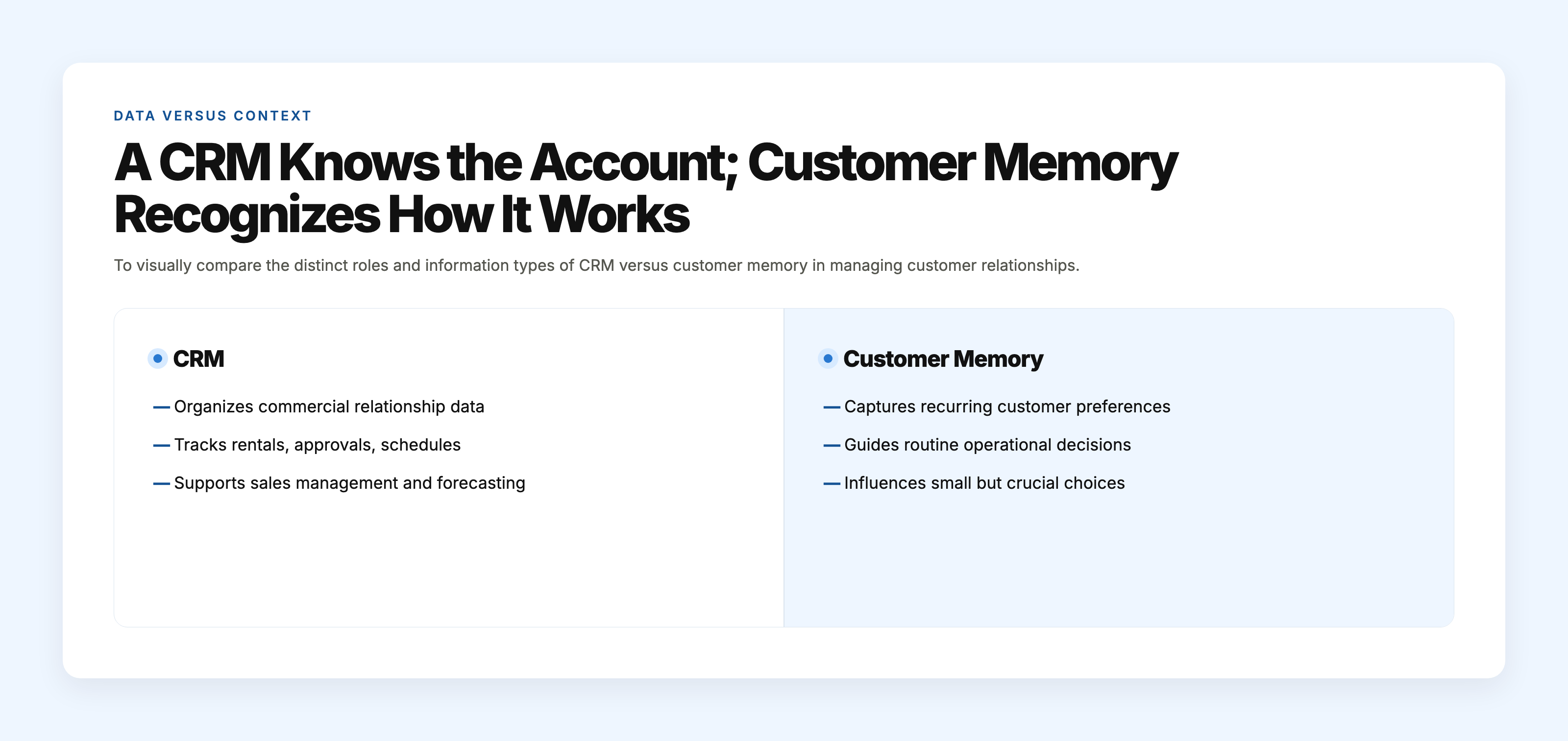
A CRM Knows the Account; Customer Memory Recognizes How It Works
A CRM is designed to organize a commercial relationship. It can tell an employee that a contractor has rented equipment six times this year, which machines were supplied, who approved the latest quote, and whether another booking is scheduled. That information supports sales management, account administration, forecasting, and service coordination.
Customer memory serves a different purpose. It might tell the employee that this contractor usually collects equipment before the main yard opens, calls the site supervisor when an urgent change comes up, and wants damage-waiver questions routed to the office manager. These details influence routine execution even when they do not change the underlying transaction.
The difference is easy to miss when one experienced employee handles most of the relationship. That person sees the account name and automatically remembers the working arrangements. The CRM appears to provide everything needed because the employee supplies the rest through personal familiarity. Once another dispatcher, coordinator, or account manager becomes involved, the separation becomes visible.
Consider a managed IT provider supporting a 40-person law firm. The CRM correctly identifies the firm, its contract, billing contact, decision-maker, and open service opportunities. The support team has also learned that routine requests should be summarized by email, while an urgent outage warrants a direct call to the operations director. A new coordinator who sees only the account data may use the same channel for both situations. Nothing in the commercial record is wrong. It simply answers a different set of questions.
Customer memory is therefore not a second sales database. It is the accumulated knowledge that helps employees recognize established ways of working. Its value shows up in small choices: who should be contacted, which channel fits the situation, which recurring preference should be applied, and when a standard process needs a familiar adjustment.
Why Returning Customers Expect More Than Identification
Returning customers rarely expect every employee to know personal trivia about them. They do, however, notice when settled arrangements keep becoming open questions.
A restaurant receiving specialty ingredients every week may have a narrow receiving window between breakfast cleanup and lunch preparation. It may prefer certain products packed separately because they are stored in different parts of the kitchen. After several months, the restaurant does not view these arrangements as special treatment. They have become part of how the supplier relationship works.
When a new order coordinator asks the restaurant to confirm the same delivery window again, the request may seem minor. If another employee then combines products that are normally separated, the customer begins to wonder whether its preferences are understood beyond one familiar representative. The customer has not necessarily become angry. It has simply had to pay more attention to a transaction that was supposed to be routine.
That added effort affects buying behavior quietly. A chef may begin copying a second distributor on availability requests. An office manager may ask another IT provider for a comparison quote while renewing the current agreement. A marketing director may give a small photography assignment to a different studio. These are not always formal complaints or decisive breakups. They are low-risk tests of alternatives.
Delays create similar doubt. If a customer sends an approval through the channel it has used for months and hears nothing, the silence can feel deliberate even when the business is dealing with internal uncertainty. The customer cannot see that one employee assumed another was monitoring the request. It sees a company that received a familiar instruction and did not act.
When these failures are reconstructed internally, the record often shows plenty of activity. Someone received the message. Someone opened the account. Someone mentioned the request in chat. What is missing is a clear point at which one person accepted ownership of the recurring instruction and made it usable by the next employee.
Trust often weakens before an account is visibly lost. The customer starts verifying details, allowing more time, comparing options, or reducing the size of the next order. The commercial relationship may still appear active in the CRM during this period. Customer behavior has already become more cautious.

Two Different Jobs Inside the Same Customer Relationship
The clearest way to compare customer memory and a CRM is to look at the questions employees ask during ordinary work.
A CRM should answer who the customer is, which people are connected to the account, what has been quoted or sold, what work is scheduled, and where an opportunity stands. A commercial photographer, for example, may use the CRM to see that a regional manufacturer booked four assignments, that the marketing director signs proposals, and that the next product shoot is awaiting approval.
Customer memory should make the manufacturer’s established working preferences easy to recognize. The client may want contact sheets sent to the brand manager before full editing begins. Product photographs may have a standard crop for distributor catalogs and a separate format for social use. Urgent approvals may come through text, while final usage approval must arrive by email. These details guide execution rather than sales reporting.
The boundary is not always determined by the type of information. Stability and use matter too. A permanent billing address clearly belongs in the CRM. A recurring delivery window might fit a custom field if it applies consistently and employees need to filter or report on it. A more conditional preference—such as calling the site foreman only when a pickup occurs before 7 a.m.—may be better placed in a concise team reference connected to the account.
Trouble begins when employees expect one location to answer every possible question. One person adds preferences to contact notes. Another leaves them in an email thread. A third remembers them without documenting them. The next employee knows plenty about the account but cannot tell which operating details are current.
The amount of stored data is not the same as recognition. How Teams Actually Handle Customer Conversations Without Losing Context emphasizes that retaining operational knowledge within teams ensures that established working preferences are accessible and actionable beyond mere data storage.
An employee needs to be able to find an established arrangement before making a routine choice. A smaller amount of clearly placed information often serves that purpose better than pages of undifferentiated notes.
The Small Clarifications That Add Up Across a Month
The operating cost of repeated clarification is usually modest in a single interaction. Across a month, the pattern becomes easier to see.
Consider an illustrative operating model for an equipment-rental company. Suppose the company handles 80 repeat-customer interactions each month in which an employee needs to confirm an access instruction, pickup arrangement, or approval contact. If each clarification takes four minutes across reading, calling, waiting, and updating the booking, that produces 320 minutes of work. At an assumed loaded labor cost of $32 per hour, the direct monthly cost is about $171.
Now add three preventable preference errors during the month. One machine is staged with the wrong attachment, one early collection is not placed near the accessible gate, and one approval request goes to a project manager who is away from the site. If each event consumes an average of $75 in extra handling, rescheduling, or staff time, that adds $225. Under those assumptions, the combined operating effect is approximately $396 per month, or $4,752 per year.
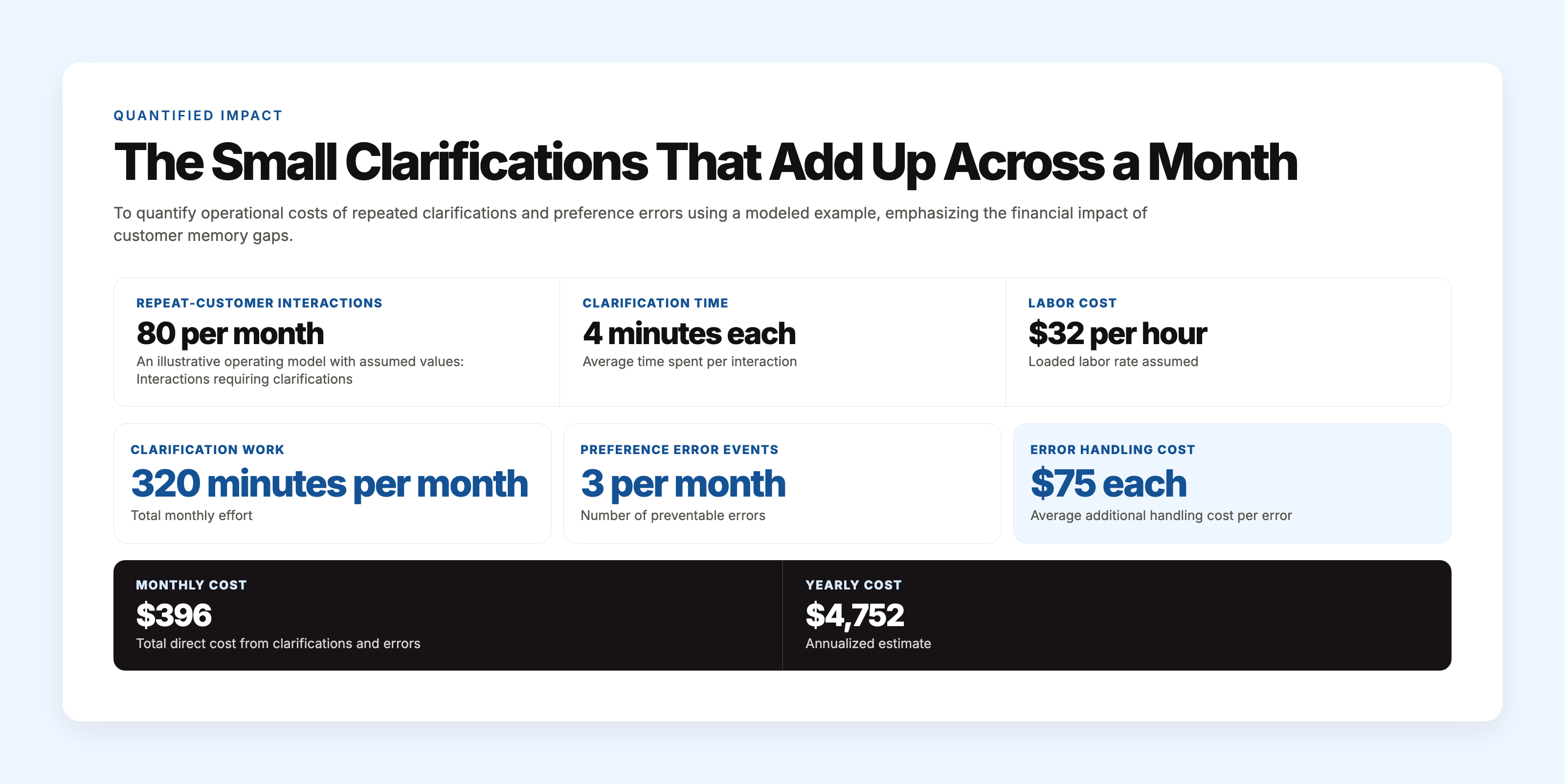
This calculation is not a benchmark or a claim about a typical rental business. It is a simple model whose result changes with interaction volume, clarification time, labor cost, error frequency, and handling cost. It also captures only selected direct expenses. It does not attempt to price schedule disruption, lost margin, customer lifetime value, or the chance that some clarification would have occurred even with a reliable reference. Its purpose is to make a recurring workflow failure visible enough to examine.
A normal day shows how this happens. At 8:15 on Monday morning, a contractor calls the rental office to reserve a compact excavator for Tuesday. The office coordinator creates the booking and sees the account, rates, prior rentals, and billing terms. The contractor mentions that the foreman will collect the machine early, as usual.
Later that morning, the coordinator tells the yard supervisor that the booking is entered. She assumes the account manager will explain the early-pickup arrangement because he normally handles the contractor. The account manager sees the confirmed booking and assumes the coordinator included the yard instructions. No one deliberately ignores the detail. Both employees believe the other has covered it.
At 6:40 the next morning, the foreman arrives. The excavator is ready, but it is parked behind equipment that cannot be moved until the main crew arrives. The yard employee on duty has no indication that this account normally uses the early-access area. The contractor waits 35 minutes, and two employees later spend additional time rearranging the yard and adjusting the paperwork.
The customer still receives the machine. The revenue is not immediately lost. Yet the convenience attached to repeat business has been reduced, and the contractor may call another rental company first the next time an early start matters. Quiet opportunity loss often begins with a customer testing whether another provider makes the routine easier.
The operational lesson is not that every four-minute clarification must disappear. Repeated clarification often points to an arrangement the company already knows but has not made dependable. The customer experiences that gap as inconsistency, not as an information-management problem.
When a Preference Belongs in a Field, a Record, or a Durable Team Reference
Not every customer detail deserves the same treatment. Good placement depends on how stable the information is, how often it affects work, and who needs to use it.
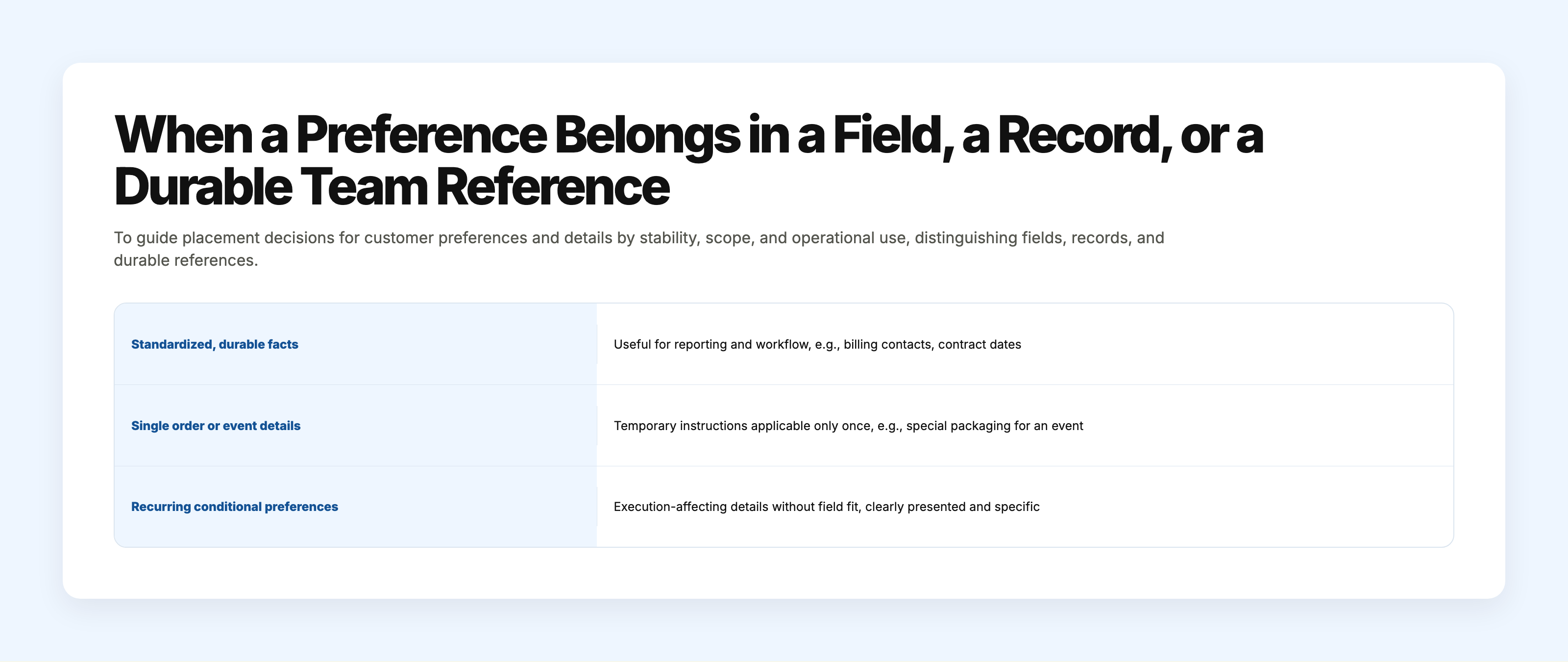
A CRM field works well for a fact that is standardized, durable, and useful for reporting or workflow. Account type, contract renewal date, tax status, service tier, and primary billing contact are common examples. A distributor might also use a defined field for a fixed delivery day if that information controls routing every week.
A transaction record is more appropriate when the detail applies to one order, project, or service event. A restaurant may request different packaging for a single catered event. A photography client may authorize one unusual image format for a specific campaign. Treating those temporary instructions as permanent preferences can create errors later.
A durable team reference is useful when a recurring arrangement affects execution but does not fit neatly into a standard field. It should be concise enough to scan and specific enough to apply. “Customer likes good service” is useless. “Routine approvals go to the brand manager; licensing changes require the marketing director” gives an employee a practical distinction.
Before deciding where information should live, four ordinary questions matter. Does this detail apply across transactions or only once? Is it stable enough to standardize? Which roles need it during their normal work? What event should prompt someone to review or update it?
The last question matters because preferences change. A restaurant changes chefs. A contractor moves to a new site. A client appoints a different brand manager. Employees need a way to recognize that a once-reliable arrangement may have expired.
Placement alone does not make an instruction authoritative. A recurring preference also needs a recognizable owner. In some businesses that is the account manager; in others it is the coordinator responsible for scheduling or the service lead who confirms operating arrangements with the customer. The title matters less than the fact that employees know who can confirm a change and who is responsible for updating the durable reference.
A useful record also shows enough context to distinguish a standing arrangement from a temporary exception. “Use south gate” can become dangerous if it came from one construction phase six months ago. “Use south gate for pickups before 7 a.m.; confirmed with site supervisor on 12 March” tells the next employee what applies, under which condition, and when it was last verified.
Temporary exceptions need visible limits. If the contractor asks for the north gate during one week of roadwork, that instruction belongs with the affected bookings or carries an explicit end date. Otherwise, an employee may copy the exception into the standing account reference, and a one-week workaround quietly becomes the company’s permanent understanding.
Changes also need to retire the old version. Updating the authoritative reference while leaving an equally prominent instruction in a dispatch template, pinned chat message, or account note creates two current-looking answers. In practice, employees often follow the version nearest to the task, not the version most recently edited. Superseded instructions need to be marked, removed from active use, or linked back to the current source.
The aim is not to document every conversational detail. It is to retain recurring information that changes how work is carried out. A preference earns deliberate treatment when forgetting it would cause an employee to contact the wrong person, use the wrong process, create avoidable delay, or ask the customer to settle the same matter again.
Why More Notes Do Not Automatically Create Better Understanding
The easiest response is often to tell employees to write more notes in the CRM. That can help, but volume alone rarely makes an account easier to serve.
General notes fields tend to collect several types of information at once: temporary order comments, call summaries, personal reminders, outdated instructions, and durable preferences. An employee looking for one approval rule may have to scan entries from several months. Under time pressure, many people stop reading after the first few lines.
Adding a custom field for every possible preference creates a different burden. Equipment-rental staff may need fields for gate access, collection timing, authorized operators, fuel arrangements, site contacts, and invoice routing. A specialty distributor may need fields for packaging, receiving windows, substitutions, storage constraints, and order channels. Soon the account page becomes cumbersome, and employees complete fields inconsistently.
Copying the same information into email, chat, scheduling software, and CRM notes also feels reassuring at first. The weakness appears when the preference changes. The account manager updates the CRM, the dispatcher reads an older chat message, and the office coordinator follows an email template containing the previous instruction. Duplication produces several plausible answers without indicating which one is current.
A date by itself does not always solve the problem. The newest entry may describe a one-time exception rather than a permanent change. Employees need to know whether the customer replaced the standing arrangement, suspended it for a specific transaction, or merely asked for something different that day. Without that distinction, “most recent” can be mistaken for “authoritative.”
Informal employee knowledge presents another tradeoff. Experienced people can recognize dozens of account habits and often apply them without pausing. That efficiency is valuable. It also makes the company look more consistent than its shared information supports. When schedules shift or more employees begin serving the account, routine service starts depending on who happens to be working.
That is usually where ownership confusion enters. An employee may record a new packaging preference but assume someone else will revise the standing instruction. Another sees the note but treats it as temporary. A week later, both say some version of “I thought you handled it.” Activity is visible; responsibility for keeping a recurring preference current is less obvious.
The failure often survives because no single moment looks serious enough to escalate. The order is corrected. The customer repeats the instruction. An experienced employee explains the arrangement in chat. Work continues. Yet the underlying reference remains unchanged, so the same uncertainty returns with the next shift, absence, or new hire.
Clear treatment means separating temporary instructions from established arrangements, avoiding unnecessary copies, and making update ownership visible. A recurring preference becomes dependable when employees can identify the current instruction, see the condition under which it applies, recognize when it was confirmed, and know who resolves uncertainty.
More documentation can increase noise. Better placement helps employees act. Clear authority keeps the information usable after the person who first heard it is no longer in the room.
Using Customer Memory Alongside the CRM
A practical operating approach allows the CRM to continue doing the work it handles well. Contacts, companies, opportunities, quotes, scheduled activity, account stages, and commercial history belong there. Employees should not have to search a separate reference to determine whether a proposal was accepted or an invoice contact changed.
Alongside that record, the business can maintain a concise set of recurring working preferences. The exact location will vary. Some companies can use carefully selected CRM fields and a clearly labeled account section. Others may need a connected team reference because the preferences are conditional or shared across service, scheduling, and customer communication.
The location matters less than what employees encounter at the moment of work. A gate-access instruction that exists only on a page the dispatcher never opens is technically documented but operationally absent. A current approval rule buried beneath six months of notes creates nearly the same problem. Information becomes useful when the employee making the decision can recognize it without reconstructing the account’s history.
The team also needs simple boundaries. Employees need to know when a spoken comment is a one-time request and when it signals an ongoing arrangement. If a long-term IT client says, “For future outage notices, call our operations director before emailing the group,” that statement affects future work. It deserves different treatment from a request to call about one current incident.
Calls and ordinary conversations are often where these arrangements emerge. The aim is not to preserve every word. It is to recognize the small portion that should influence future service and make it available to the people who will need it. The employee who hears the change may not be the person authorized to make it permanent, but the handoff cannot end with a note that someone else is expected to interpret later. Someone needs to confirm whether the instruction is recurring, update the current reference, and retire the version it replaces.
That maintenance does not require an elaborate new database. It requires structural alignment: account-management information remains attached to the commercial record, transaction-specific instructions remain attached to the relevant work, and recurring operating preferences appear where the employees serving the account can reliably find them.
Customer memory and CRM work best as complements. One organizes the commercial account. The other preserves the established way that account operates across employees, shifts, and ordinary handoffs.
Key Takeaways
- A CRM records the commercial relationship; customer memory preserves how the relationship works in practice.
- Repeated clarification often signals knowledge the company already has but cannot use dependably.
- Temporary instructions, durable preferences, and standardized account facts serve different operational purposes.
- More notes do not create clarity when ownership, authority, and current status remain uncertain.
- Customer trust often weakens through added effort before account loss appears in the CRM.
Conclusion
The practical test is often one recurring customer detail that affects day-to-day service but cannot be understood easily from the standard account record. Its proper place may be a field, a transaction, or a durable team reference. Its authority becomes visible through who confirmed it, when it applies, who maintains it, and which older instruction it replaced.
That small distinction often exposes where two different jobs have been treated as one. A CRM can show that the relationship exists and record what the company sold. A 14-day free trial can help a team test whether clearer communication context improves the continuity of everyday customer work.
Customer memory carries the practical recognition that makes a returning customer feel like the relationship survived the handoff.

.svg)
.png)
