


Here are three texts an insurance agency might get in the same week:
"Can you send me my ID card? The dealer needs it."
"Need proof of insurance for the DMV by Friday."
"Lost my insurance card, can you email a new one?"
A keyword search for "ID card" finds one of them. Anyone who works at the agency knows all three are the same request. That gap is where AI earns its place. When you analyze customer conversations with AI, the tool can read a month of messages and group them by what each customer needs, even when they share no words at all.
We've been in business phone and texting service since 2005, and insurance agencies are a big part of our client base, so that's the example we'll use. The method works the same way for a body shop, a law office or a moving company. Here's what the AI is actually doing, a process you can run on your own messages, the mistakes to check for, and how to sort the results into things worth changing.
What the AI is doing when you analyze customer conversations
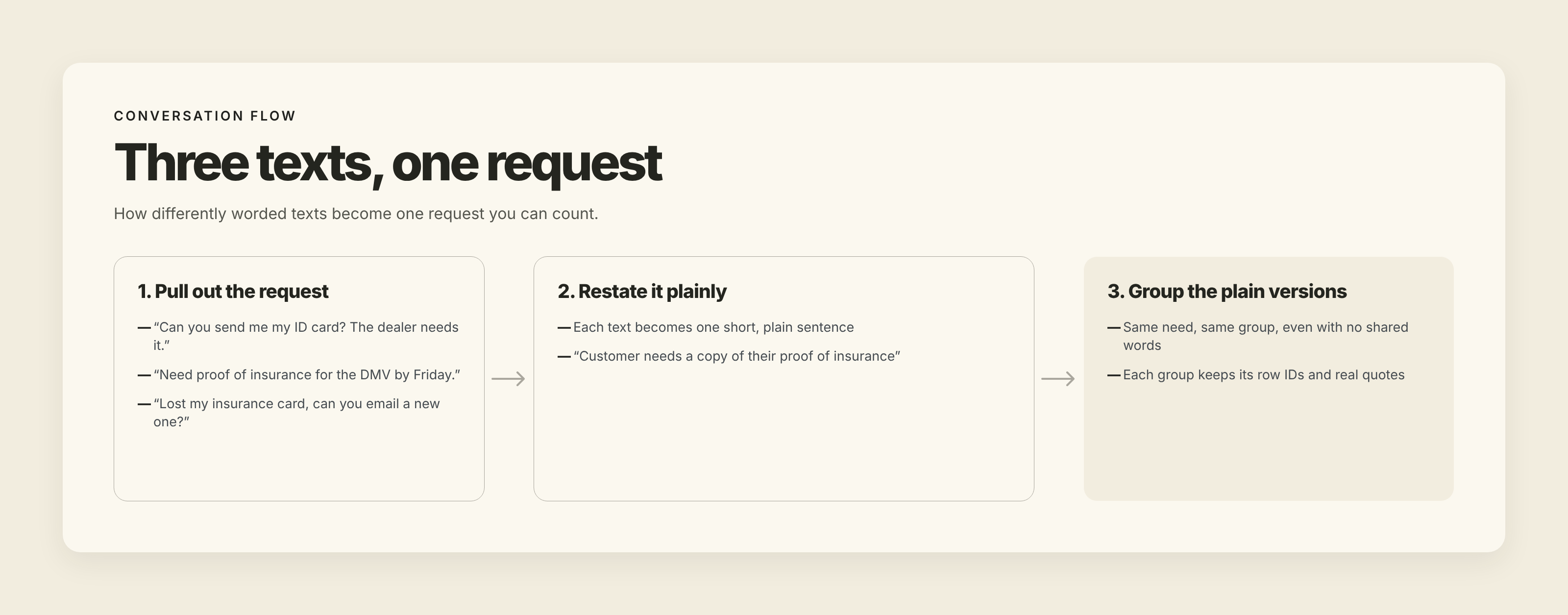
Asking an AI tool for "the main themes" in your texts usually gets you broad buckets like "policy questions" and "billing." Useful grouping happens in three steps, and each one can go wrong in its own way.
- Pull out the request. A single text often holds a greeting, a question, a complaint and a thank-you. The first job is to find what the customer actually wants and set the rest aside.
- Restate it plainly. "Dealer needs it," "DMV by Friday" and "lost my card" all become something like "Customer needs a copy of their proof of insurance."
- Group the plain versions. Once every message is a short, plain request, messages that mean the same thing end up side by side.
The second step does more than most people expect. A 2026 conference paper compared four ways of grouping customer service conversations from a research dataset and found that having a language model first rewrite each one as a short, normalized issue statement improved the groups more than any other step. That's one study on one dataset, but it lines up with the method below: get the plain statements first, then group them.
A process you can run on one month of messages
You need three things: an export of your messages, a spreadsheet and a general AI assistant.

1. Pick the question you want answered
Start with something specific, like "What do customers text us for that they could have handled without us?" or "What do people ask in the first two weeks after they buy a policy?" Your question decides which dates and which messages go into the file.
2. Export the messages and clean the file
Many business texting systems let you export a message log as a spreadsheet. Export one month, with both directions included, and sort it by customer and then by time. Give every row a short ID number (1, 2, 3...) and keep the date and the direction column, which marks whether a message came in or went out.
Then remove what the AI doesn't need to see. First add a column that gives each customer a code (Customer 1, Customer 2...) so you can still tell one conversation from the next. Then delete the columns with phone numbers and contact names. That's the easy part. Names, policy numbers and claim numbers also turn up inside the message text itself, so search the text column for them before anything leaves your computer.
Check your AI plan's data settings, too. OpenAI, for example, says it doesn't train its models on data from its business plans or its API by default, while on personal ChatGPT plans that sharing is on until you switch it off. Insurance agencies, law offices and medical practices have their own rules about customer information, so check with whoever handles your compliance before you send customer messages to any outside tool, even with names removed.
3. Ask for extraction first, grouping second
Run it as two separate requests. In the first, ask the AI to go through the inbound rows only and write each customer's request as one plain sentence, keeping the row ID. Tell it to use the row just before each inbound message for context, but only when that row has the same customer code, so a short "Did you get it?" can be read as "Customer is asking whether we received the photos they sent of the damage." Your own replies stay in the file for that reason, but they don't get grouped.
In the second request, ask for the groups. A prompt along these lines works well:
"Group these customer requests by what the customer needs. For each group, give a short, specific name, list every row ID in it, and quote three original messages exactly as written. Put requests that don't fit any group in a group called Other. Keep requests in separate groups if they need different answers, even when they're about the same topic."
Asking for row IDs lets you check every group. Asking for exact quotes keeps each group tied to what customers wrote.
A month of texts at a busy agency can run into thousands of rows, and chat assistants sometimes skip rows without saying so. Send the file for that first request in batches of a few hundred rows, and check that every row ID you sent came back in the answer. Then run the grouping request once, on all the plain sentences together. They're short, so a month's worth will often fit in one request. If it doesn't, give the AI the group names from the first round and tell it to reuse them.
You should end up with groups that look something like this:
Customer needs a copy of their proof of insurance. Rows: 14, 52, 87, 133, 210... Examples: "Can you send me my ID card? The dealer needs it." / "Need proof of insurance for the DMV by Friday." / "Lost my insurance card, can you email a new one?"
4. Let the spreadsheet do the counting
Language models are unreliable at counting. A team at Singapore's 2025 Hack for Public Good, building a prototype for clustering large sets of open-ended responses, named miscounting as one of the two key problems with using these models for the job, next to checking for invented output. So ignore any "about 40 messages" in the AI's answer. Copy the row IDs for each group back into your spreadsheet, tag each row with its group name, and let the spreadsheet count.
5. Read a sample from every group
Open each group and read ten or so of the original messages. This is the step people skip, and it catches most of the mistakes described below. You're reading a sample from each group, so even a large file doesn't take long.
Mistakes to check for before you trust the groups
The AI merges requests that need different answers. "Is my new car covered?" from someone shopping for a car and the same words from someone who just had an accident in it belong in different groups. A model grouping by topic can put them together. You'll catch it when the quoted examples in one group would need two different replies.
It can make the groups look tidier than your messages are. Real customer requests are uneven: one group might hold a third of everything, with a long tail of small ones. If the AI hands back a few neat categories of roughly equal size, read the Other group and the smallest groups closely before you believe it.
It loses meaning when context is missing. Short replies like "ok which one?" or "still nothing" only make sense next to the message before them. That's why the file keeps your replies in it. Any short message the AI couldn't place should end up in Other, not forced into a group.
It can describe messages that aren't there. If a group's quotes don't match the rows it lists, or the quotes aren't word for word, treat that whole group as suspect and check it against the spreadsheet.
Used this way, the AI does the fast first read of thousands of messages. You still decide which groups are real.
Sort each group: answer it, fix the process, or leave it to a person
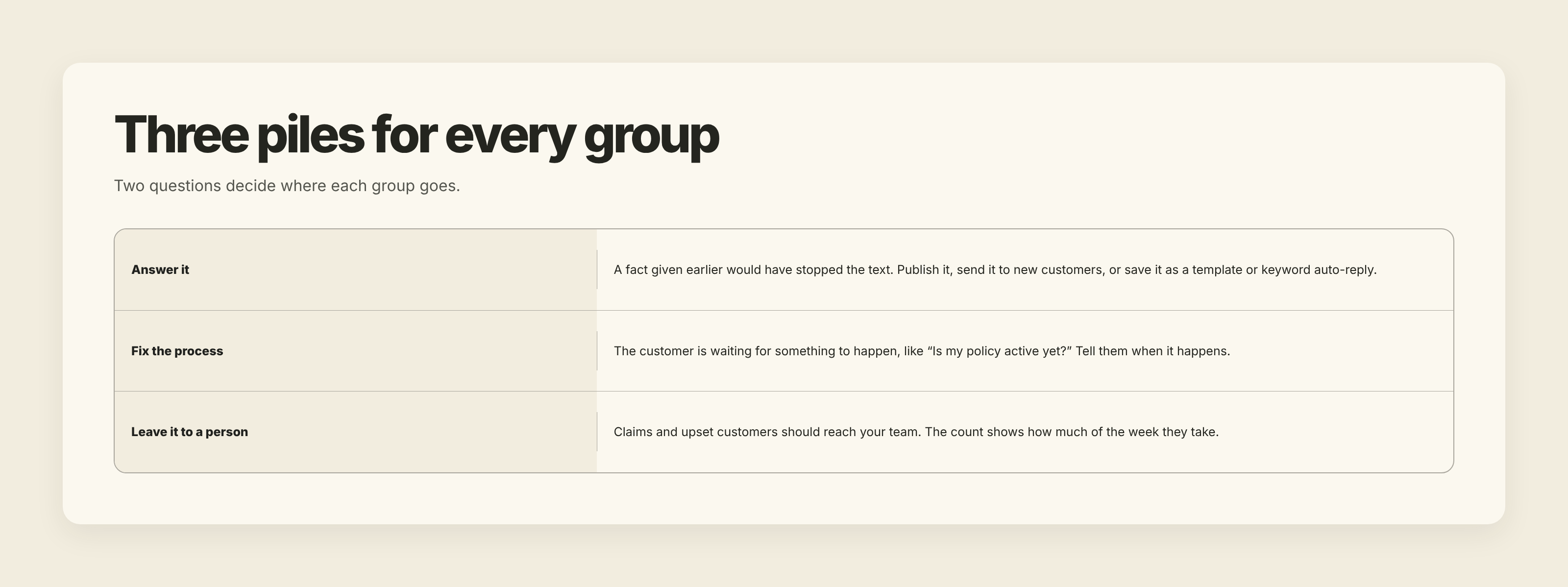
Once you have groups you trust, each one goes into one of three piles. Two questions decide which.
First: could a fact, given earlier, have stopped this text? Office hours, how to get a copy of an ID card, which payment methods you take. If yes, the fix is an answer the customer sees before they reach for their phone: put it on your website, add it to the text you send new customers, save it as one of your message templates so anyone on the team can send it in one tap, or set up a keyword auto-reply so a customer who texts a word like IDCARD gets the instructions immediately.
Second: is the customer waiting for something to happen? Take "Is my policy active yet?" from people who bought a policy a day or two ago. No FAQ answers that, because the customer wants to know about their policy, today. A better script for the reply only makes your team faster at answering a text that shouldn't need to be sent. The fix is in the process: send a short text when the policy is in force, with the effective date, and that group should start to shrink.
Some groups belong in a third pile: leave them with a person. A customer reporting a claim, or upset about a rate increase, should reach someone on your team. Don't automate these just because they repeat. What the count tells you here is how much of your team's week they take, which is useful when you plan who covers the phones and texts.
Keep in mind what the groups can and can't tell you. They show what customers asked, and how often. They don't show why, and they don't prove that the fix you have in mind will work. For the bigger picture of where this fits, our guide to what conversation intelligence is covers the idea behind it, and conversation history vs. conversation intelligence explains why a complete record of messages is only the starting point.
Write down the evidence next to every change
Whatever you change, record four things in the same spreadsheet: the group name, how many messages it held, what share of that month's inbound texts that was, and two or three of the original messages that convinced you.
That record settles the argument the next time someone on your team insists customers "always" ask something. It also tells you, months later, why the welcome text got longer or why you started sending a confirmation text. And it gives you a baseline for the check in the last section.
How this works with TMMN
Text My Main Number doesn't analyze your conversations with AI. What it gives you is the file to start from and the tools to act on what you find.
Users with access to the message log can export it as an Excel or CSV spreadsheet or as a PDF. The export includes the date, the message text, the direction and which team member sent each outbound message. Contact names appear in place of numbers for anyone saved in your contacts, so delete those columns along with the numbers before the file goes anywhere.
Once you know which questions keep coming in, you can save the answers as message templates and set up keyword auto-replies. The number of keywords and templates depends on your plan, and the pricing page has the details. To try it with your own business number, start with the 14-day free trial.
Check the same group a month later
After you make a change, give customers time to see it, then export the next month and run the same two requests. Look at the group you fixed, and compare its share of all inbound texts, not its raw count, since a busy month or renewal season can push every number up. If its share dropped, your change is probably doing its job. If it didn't, read the newest messages in that group before you try another fix. Customers who still ask after the change are telling you, in their own words, what your answer missed.

.svg)

