


A customer sees your number on your sign, your website or your last invoice, and they text it. Who on your team sees that text, and who answers it?
In a lot of small businesses, the honest answer is "whoever has the phone." That works when one person runs the front desk all day. It stops working the moment two or three people need to talk to customers, cover for each other, or pick up a conversation someone else started yesterday.
Multiple employees can text from one number, the main business number your customers already know. The customer sees one number and one business. Behind it, each employee has their own login, everyone works from the same conversation history, and you can see who said what. The setup you choose decides whether it holds up on a busy day.
We've been in business phone service since 2005, and we've seen most of the ways teams try to share a number. Here's what tends to break, what a working setup looks like, and what to ask before you pick a provider.
The three ways teams usually try it, and where each breaks
Most teams don't plan this. They fall into one of three setups.

One phone at the front desk
The business number lives on a single cell phone that sits at reception. Whoever is working picks it up.
It's simple, and it works until the phone goes home with someone by accident. Two employees need to reply at the same time and only one of them can. A customer texts at 6:40 p.m. and nobody sees it until the next morning, because the phone was in a drawer. And when there's a question later about what was promised, you're scrolling through one device trying to piece it together.
Employees texting from their personal cell phones
This one usually starts with good intentions. A customer asks a quick question, and a helpful employee answers from their own phone because it's faster.
The problems show up later. The customer now has your employee's personal number, not your business's, and they'll keep using it. Nobody else on the team can see that conversation, so if the employee is off, the customer waits. The texts never make it into your records. And when that employee leaves, those conversations leave too.
Your employees also didn't sign up to get customer texts on their day off. Most of them don't want that.
A phone system that shares calls but not texts
Many business phone systems are very good at sharing calls. A call to the main number can ring several desks at once. People assume texts to that number work the same way. Often they don't.
That's because calls and texts travel differently. Your phone system decides which desks ring when someone calls. Texts don't go through that part of the system. They go to whichever company your number is text-enabled with, and they land wherever that company delivers them: one user's app, one extension, or a place the whole team can see. Your voice service can even stay with your phone company while your texting runs through a different provider.
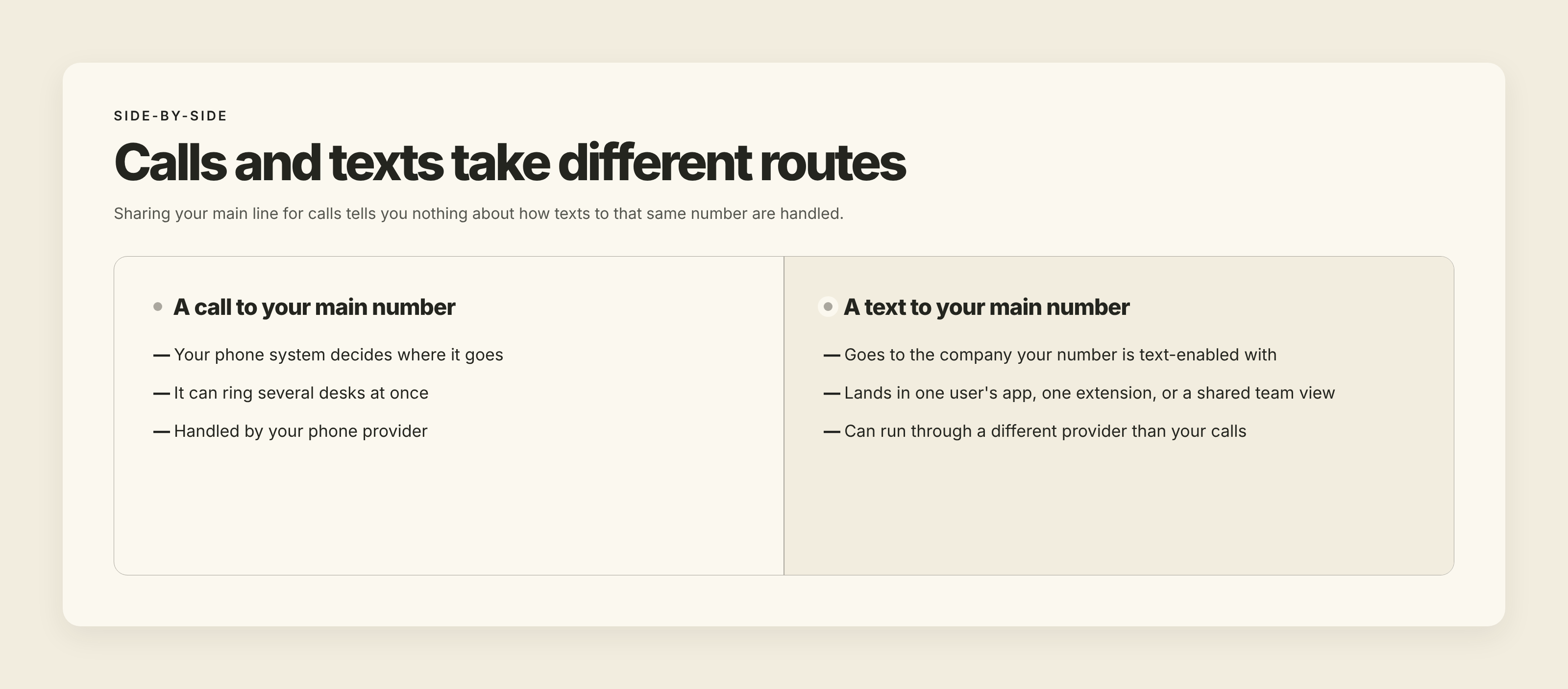
So "our phone system can share the main line" tells you nothing about texting. On some systems, texts can only be sent and received from an individual user's line, not from the main company number, and some teams only find out after they've switched. On RingCentral's public ideas board, a request to let multiple users send and answer texts from the main company number was posted in April 2021 and collected more than 1,400 votes. It was marked implemented in May 2026. If you're on a phone system now, ask exactly how texting to your main number works on your plan before you assume it does.
What it takes for multiple employees to text from one number
Whatever provider you use, a setup that lets your whole team text from one number needs a few things. If any of these are missing, you'll feel it within the first month.
- The number your customers already know. Your customers have your main number saved. In most cases you can keep it and add texting to it, even if it's a landline or a VoIP line. If you've never done that, here's how to text-enable a landline without changing your number.
- A separate login for every employee. No shared passwords and no passed-around phone. Each person signs in as themselves, so you always know who sent which message.
- One conversation history per customer. When a customer texts, anyone covering should see the whole thread: what was asked, what was already answered, and what was promised.
- One identity to the customer. The customer should see your business number every time, no matter which employee replies. They shouldn't have to know your staffing schedule.
- Access from wherever your team works. Front desk staff usually want a computer. Field staff and owners want their phone. A good setup gives both, using the same conversations.
- Proper registration. Business texting from a regular local number in the US runs through carrier registration known as 10DLC. Your provider should handle this with you. If you're unfamiliar with it, our 10DLC registration guide explains what's involved.
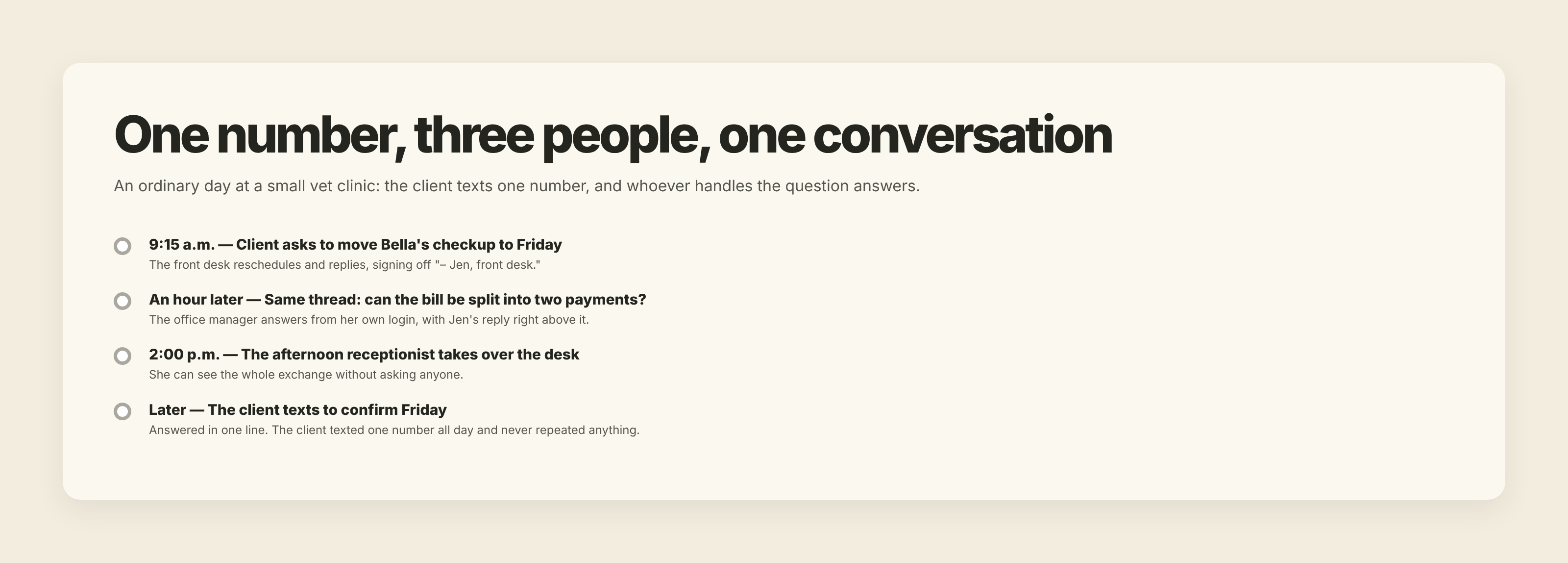
Here's what that looks like on an ordinary day. Picture a small veterinary clinic with one main number. At 9:15, a client texts: "Can I move Bella's checkup to Friday?" The front desk moves the appointment and replies, signing off "– Jen, front desk." An hour later, the same client asks in the same thread whether the clinic can split last month's bill into two payments. Jen doesn't handle billing, so the office manager answers it from her own login, using the same number, with Jen's earlier reply right above it. At 2:00 the afternoon receptionist takes over the desk. When the client texts to confirm Friday, she can see the whole exchange and answers in one line. The client texted one number all day and never had to repeat anything.
None of this is fancy. It's about making sure a text sent to your business is treated as a message to the business, not to whichever person happened to be holding the phone.
Decide who answers what before you add people
Giving five people access to the same number without any rules creates a new problem: two people answer the same customer, or nobody does.
You don't need a complicated process. You need a few decisions written down.
Who covers the main number during business hours? Pick a person or a role for each part of the day. Everyone else can still see the conversations, but one person is responsible for making sure nothing sits unanswered.
What gets handed off, and to whom? Billing questions might go to the office manager. Scheduling might stay at the front desk. Some systems let you control which conversations each person sees. Either way, the employee who receives a question they can't answer should know exactly where to send it.
How do you sign off? A short sign-off like "– Maria, front desk" tells the customer they're talking to a real person and tells your team who's handling the conversation. It also makes a handoff feel natural: "Hi, this is Dave from billing, Maria passed along your question."
What happens after hours? Decide whether anyone answers in the evening. If nobody does, set an automatic reply that says when the customer will hear back.
If your team handles a lot of conversations, a shared inbox and a simple way to assign, track and close conversations will save you a lot of "did anyone answer this?" moments.
When someone leaves or calls out sick
When the conversations live in a business account instead of on someone's phone, an employee calling out sick doesn't stop anything. Whoever covers picks up the same conversations.
When an employee leaves for good, you remove their login. The customer conversations, the history and the relationship stay with your business, which is where they belong. Compare that with personal phones, where you'd have to hope a former employee forwards the right texts, or tells your customers to use a different number.
If you're moving from one person handling everything to a small team, our guide to moving from a one-person setup to team-based communication covers the bigger picture.
Questions to ask before you choose a provider
We've had clients leave us for exactly this reason: their phone provider started offering texting, and one company with one bill was tempting. Sometimes that's the right move. But "includes texting" can mean very different things, so ask these questions first.
- Can every employee send and receive texts from our main number, or only from their own extension?
- Can we keep our existing number, including a landline, and add texting to it?
- Does everyone see the same conversation history, or does each person only see their own messages?
- Can we tell which employee sent each message?
- Does it work on both computer and phone, with the same conversations on each?
- What does it cost per user, and do we pay extra for a shared inbox or for texting from the main number?
- Who handles 10DLC registration, and how long does it take?
- When we remove an employee, what happens to their conversations?
If a provider can't give you a clear yes on the first question, it doesn't matter how good the rest is. That's the whole point of sharing a number.
How this works with TMMN
Here's what Text My Main Number gives you. You keep your existing business number, landline or VoIP, and add texting to it. You add each team member as a user with their own login, and everyone assigned to the number sees the same conversations. Roles and permissions control who can send messages, view the message log or change settings, and the message log records which user sent each text.
One thing to know up front: our Starter plan includes one user. Team plans start at two users, and you can add more. The pricing page shows how many users each plan includes.
Your team can work from the iOS and Android apps or from any computer with a modern browser, with nothing to install. Templates and auto-replies help with the questions you answer every day and with after-hours coverage, and texts can be forwarded to email if someone prefers to work that way. On plans with picture messaging, customers can send a photo of the part, the damage or the paperwork.
If you want to see how it fits your team, the 14-day free trial is the easiest way to find out with your own number and your own staff.
The short version
- Several employees can text from one business number. Customers see one number, and each employee has their own login.
- Passing one phone around and texting from personal cells both break as soon as you have more than one person, and personal cells take your customer conversations with them when people leave.
- Sharing calls on the main number doesn't mean sharing texts. Ask how texting works on your plan.
- A working setup keeps your existing number, gives everyone a login, shows one history per customer, and is properly registered.
- Decide who covers the number and how handoffs work before you add people.
Here's a two-minute test: text your main business number from your own cell phone, then ask your team who saw it. If the answer is "nobody" or "only one person," you know what to fix.

.svg)

