Buy Template
Tips and Tutorials

Email to SMS for Business: When Interoperability Helps

Learn when bridging email and business texting helps desk staff, what to test before relying on it, and when the texting app is the better place to answer.

Email to SMS for Business: When Interoperability Helps

Picture a commercial window-cleaning company in Columbus, Ohio. Its office manager, Laura, spends much of the day in email, arranging schedules with property managers. A building supervisor texts the business number: “Can your crew start before the lobby opens?”

Email to SMS for business could let Laura send a short answer from the inbox already open on her screen, while the supervisor stays on text.

Then rain changes the exterior-cleaning schedule. The supervisor asks whether the interior work will still happen. The property manager wants a revised date. Before answering, Laura needs to know exactly what was promised.

That return trip is what we would judge. Can the employee read the reply, understand it, and answer correctly without hunting somewhere else?

When Email to SMS for Business Helps

With email-to-text, an employee writes an email that a business texting service turns into a text from the business number. With text-to-email, a customer’s text arrives in an inbox. Whether the employee can answer straight from that email depends on the service.

The best fit is an occasional, short exchange handled by someone already working in email. The customer asks about access; the office answers; the customer confirms. If the employee can finish that exchange in the inbox, the bridge can remove a switch between tools.

But receiving an email notification is only part of the job. The employee still needs somewhere workable to answer, see the next question, and check earlier promises.

Carrier Email-to-Text Addresses Work Differently

You may remember sending a message to an address made from someone’s mobile number and a carrier domain. That consumer shortcut depends on the recipient’s carrier gateway.

A business texting service should be evaluated around a different requirement: can your team send texts using the business number customers already know? Check that explicitly rather than assuming any email-to-text method provides it.

Carrier gateways have also changed. AT&T’s shutdown notice says its email-to-text and text-to-email service ended on June 17, 2025. Verizon’s shutdown notice describes an ongoing closure, with completion anticipated by March 31, 2027; some senders may lose access earlier.

Verizon also says messages may fail because of spam filtering or because a recipient disabled email-to-text.

Those notices concern those carriers’ services. They are good reasons to avoid building a customer communication routine around an old carrier address simply because it worked before. For a business, the useful buying question is how messages leave your number and how customers’ replies return to your team.

Follow the Reply Before Choosing a Service

A successful outbound text makes an incomplete demonstration. Ask to see the customer reply, the employee’s answer, and the customer’s next question.

That is the practical test behind how two-way business texting works: the conversation must remain usable after the initial send.
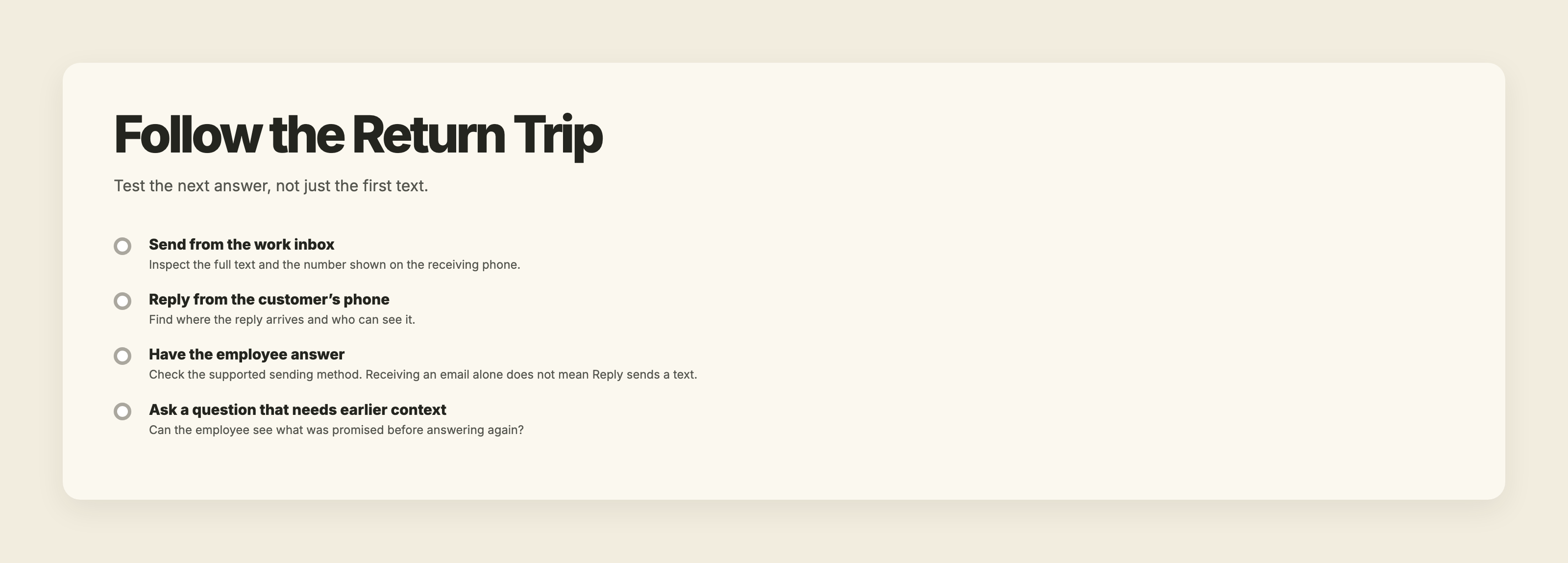
Four-step service test: send from email, locate the customer’s reply, check how the employee answers, and ask a follow-up that requires earlier context.

Check the Number and the Reply Destination

Look at the receiving phone. What number appears? Can the customer reply to it? Where does that reply arrive, and can the responsible employee answer from there?

Then check sending access separately. If several employees use a desk inbox, which of them are authorized to send texts through the service? What happens when someone covers the office manager’s work?

A shared email address alone answers neither question. Businesses planning to have multiple employees text from one business number should check both the customer-visible number and each employee’s access.

Read What Arrives Before Answering Again

Ask whether the email shows only the latest text or enough earlier conversation to understand it. Can the employee distinguish the customer’s words from the business’s previous answers?

At the window-cleaning company, “Yes, that still works” could refer to early lobby access, the interior cleaning, or the proposed rain date. The answer needs its earlier question.

Inspect the Whole Converted Message

Send from the employee’s normal email setup, including its usual signature. Inspect the text on the receiving phone for subject text, disclaimers, quoted replies, and anything else the employee did not intend to send.

Do not assume automatic cleanup. A short answer typed above an email chain may produce something much longer if that chain is included.

Longer texts can require multiple SMS parts. Ask how the service handles and charges for the final converted message, rather than judging length only by the sentence the employee typed.

Test Pictures and Attachments Separately

For the window-cleaning example, send an incoming phone photo of damaged window film. Separately, try an outgoing PDF containing the cleaning schedule.

Where does each item appear? Is the picture visible in email, attached, linked, or available in the texting app? What happens to the PDF? Does the sender receive a warning if something cannot transfer?

A text-only demonstration will not answer these questions. Neither will a general statement that a service supports picture messaging. Test the particular email-to-text route your employee intends to use.

Find Where Failed Texts Are Reported

Ask where an employee sees an SMS failure and who checks that location. If the answer is a screen outside email, include that check in the working routine.

An email leaving the outbox gives you no basis to assume the customer read the text. Understanding what SMS delivery statuses mean helps keep a sending result separate from a customer’s acknowledgment.

For an access arrangement that determines whether a crew can work, ask for a clear response. “Please confirm someone can let us in” gives the office something concrete to wait for.

Run a Normal-Workday Test

Use the email settings your employee actually works with. A clean demonstration with the signature removed will miss problems that appear during ordinary replies.

  1. Send a short access question through the proposed setup and inspect the number and full text on the receiving phone.
  2. Reply from that phone and check where the answer arrives.
  3. Continue with a follow-up that depends on the earlier question. Check whether the employee has enough history to answer.
  4. Test an incoming photo and an outgoing attachment separately. Inspect where each appears and any warning provided.
  5. Ask the provider to demonstrate a failed send. Find the failure reason and decide who will check it.

Keep a brief record of what worked and where the employee had to leave email.
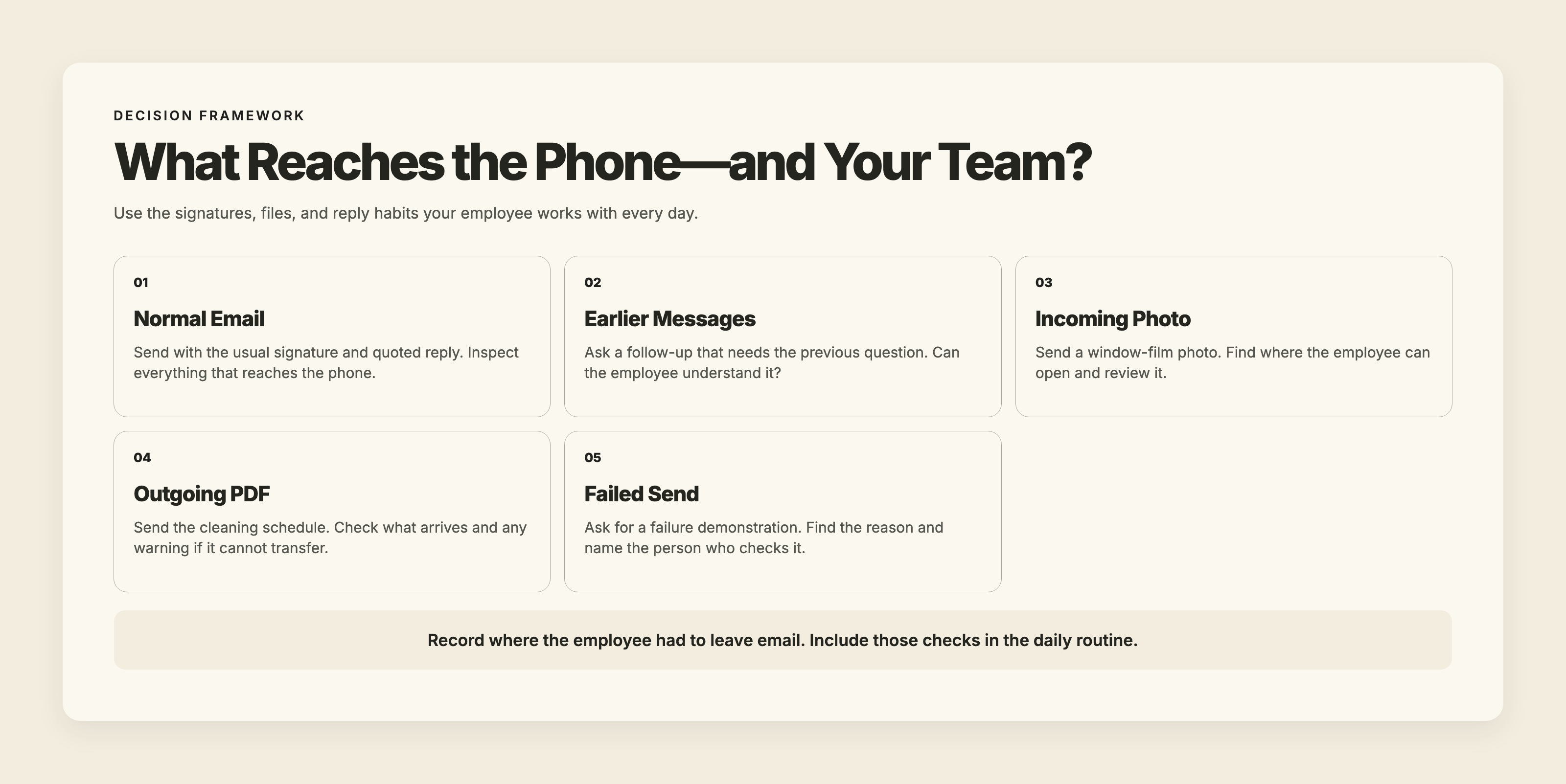
Five checks for an ordinary email-to-text routine: signature and quoted text, earlier messages, incoming photo, outgoing PDF, and the location of failed-send reasons.

Test It on a Busy Exchange

Return to the rain reschedule. The building supervisor asks whether the lobby cleaning is still happening. Another text clarifies when someone can provide access. A photo raises a question about the window film.

Laura now needs to connect the revised date, access arrangement, and photo before answering. The test is whether her email view gives her those details together.

The broader question of choosing SMS, phone, or email concerns the channel that suits the customer’s need. Here, the customer can remain on text while your employee chooses a better place to handle it.
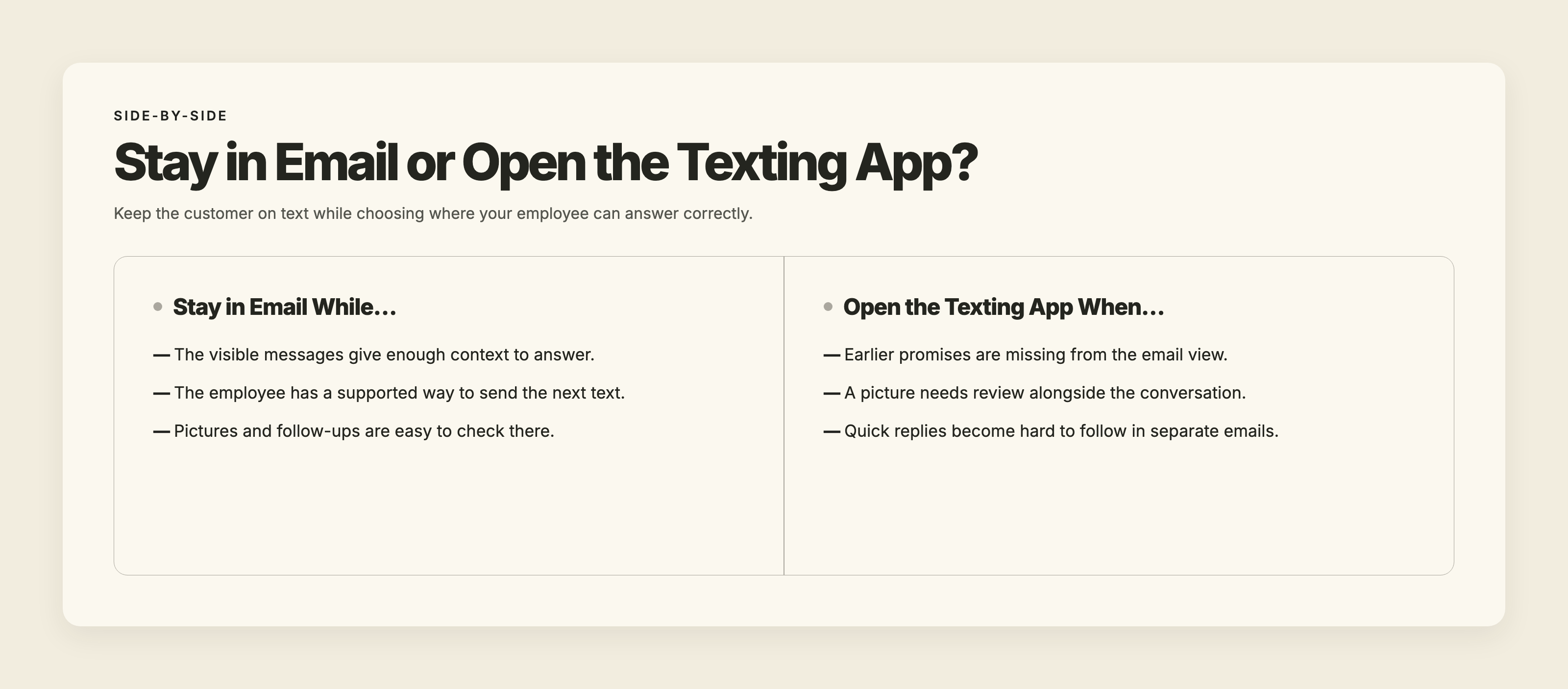
Stay in email while context and sending controls are sufficient. Open the texting app when earlier promises, pictures, or quick replies are difficult to follow.

What TMMN Offers for Email and Texting

TMMN supports text-to-email and email-to-text. You can keep your current business number—landline or VoIP—and enable texting through TMMN. Staff can also use our iOS and Android apps or work through a modern browser.

Each user can turn on incoming-text emails for the messages they can see. Each email contains one message, not the earlier conversation, and includes a link to any picture.

Email-to-text depends on your plan. An admin sets up a rule with its own email address, allowed sender email addresses, and the business number the texts come from. Recipients can be a contact group or phone numbers typed in the email’s subject line. Emails from senders outside the allowed list are ignored. Incoming-text emails and email-to-text rules are separate features, so don't assume that replying to a notification email sends a text back to the customer.

By default, TMMN removes the quoted earlier email and signature before sending the body as a text. Text longer than 1,500 characters is cut off. On plans with MMS, supported attachments go out as picture messages.

TMMN displays sent and failed, including reasons for failed attempts. A sent status records an error-free handoff to our carrier partner. TMMN does not display a delivered status.

Give Your Team a Clear Rule for Switching

Keep working in email while it gives the employee enough context and control to answer correctly. Open the texting app when it does not—whether the missing piece is earlier messages, pictures, or a quick back-and-forth that is hard to follow in separate emails. With TMMN’s one-message-per-email forwarding, an active exchange is easier to follow in the app.

Write that rule where the team can find it. The useful boundary is whether the employee has what they need for the next answer, rather than how many texts have arrived.

Try an ordinary desk-inbox routine with TMMN during the 14-day free trial, then decide which exchanges belong in email and which your team should handle in the texting app.

Ready To Strengthen Your Customer Connections?

Start your free 14-day trial and experience the impact of efficient business texting on your customer engagement.

 ·
November 19, 2026

Email to SMS for Business: When Interoperability Helps

Learn when bridging email and business texting helps desk staff, what to test before relying on it, and when the texting app is the better place to answer.

Colorful 3D email envelope with a message notification and chat bubble beneath the headline “When Email Meets Texting,” illustrating email-to-SMS communication for businesses.

Picture a commercial window-cleaning company in Columbus, Ohio. Its office manager, Laura, spends much of the day in email, arranging schedules with property managers. A building supervisor texts the business number: “Can your crew start before the lobby opens?”

Email to SMS for business could let Laura send a short answer from the inbox already open on her screen, while the supervisor stays on text.

Then rain changes the exterior-cleaning schedule. The supervisor asks whether the interior work will still happen. The property manager wants a revised date. Before answering, Laura needs to know exactly what was promised.

That return trip is what we would judge. Can the employee read the reply, understand it, and answer correctly without hunting somewhere else?

When Email to SMS for Business Helps

With email-to-text, an employee writes an email that a business texting service turns into a text from the business number. With text-to-email, a customer’s text arrives in an inbox. Whether the employee can answer straight from that email depends on the service.

The best fit is an occasional, short exchange handled by someone already working in email. The customer asks about access; the office answers; the customer confirms. If the employee can finish that exchange in the inbox, the bridge can remove a switch between tools.

But receiving an email notification is only part of the job. The employee still needs somewhere workable to answer, see the next question, and check earlier promises.

Carrier Email-to-Text Addresses Work Differently

You may remember sending a message to an address made from someone’s mobile number and a carrier domain. That consumer shortcut depends on the recipient’s carrier gateway.

A business texting service should be evaluated around a different requirement: can your team send texts using the business number customers already know? Check that explicitly rather than assuming any email-to-text method provides it.

Carrier gateways have also changed. AT&T’s shutdown notice says its email-to-text and text-to-email service ended on June 17, 2025. Verizon’s shutdown notice describes an ongoing closure, with completion anticipated by March 31, 2027; some senders may lose access earlier.

Verizon also says messages may fail because of spam filtering or because a recipient disabled email-to-text.

Those notices concern those carriers’ services. They are good reasons to avoid building a customer communication routine around an old carrier address simply because it worked before. For a business, the useful buying question is how messages leave your number and how customers’ replies return to your team.

Follow the Reply Before Choosing a Service

A successful outbound text makes an incomplete demonstration. Ask to see the customer reply, the employee’s answer, and the customer’s next question.

That is the practical test behind how two-way business texting works: the conversation must remain usable after the initial send.

Four-step service test: send from email, locate the customer’s reply, check how the employee answers, and ask a follow-up that requires earlier context.

Check the Number and the Reply Destination

Look at the receiving phone. What number appears? Can the customer reply to it? Where does that reply arrive, and can the responsible employee answer from there?

Then check sending access separately. If several employees use a desk inbox, which of them are authorized to send texts through the service? What happens when someone covers the office manager’s work?

A shared email address alone answers neither question. Businesses planning to have multiple employees text from one business number should check both the customer-visible number and each employee’s access.

Read What Arrives Before Answering Again

Ask whether the email shows only the latest text or enough earlier conversation to understand it. Can the employee distinguish the customer’s words from the business’s previous answers?

At the window-cleaning company, “Yes, that still works” could refer to early lobby access, the interior cleaning, or the proposed rain date. The answer needs its earlier question.

Inspect the Whole Converted Message

Send from the employee’s normal email setup, including its usual signature. Inspect the text on the receiving phone for subject text, disclaimers, quoted replies, and anything else the employee did not intend to send.

Do not assume automatic cleanup. A short answer typed above an email chain may produce something much longer if that chain is included.

Longer texts can require multiple SMS parts. Ask how the service handles and charges for the final converted message, rather than judging length only by the sentence the employee typed.

Test Pictures and Attachments Separately

For the window-cleaning example, send an incoming phone photo of damaged window film. Separately, try an outgoing PDF containing the cleaning schedule.

Where does each item appear? Is the picture visible in email, attached, linked, or available in the texting app? What happens to the PDF? Does the sender receive a warning if something cannot transfer?

A text-only demonstration will not answer these questions. Neither will a general statement that a service supports picture messaging. Test the particular email-to-text route your employee intends to use.

Find Where Failed Texts Are Reported

Ask where an employee sees an SMS failure and who checks that location. If the answer is a screen outside email, include that check in the working routine.

An email leaving the outbox gives you no basis to assume the customer read the text. Understanding what SMS delivery statuses mean helps keep a sending result separate from a customer’s acknowledgment.

For an access arrangement that determines whether a crew can work, ask for a clear response. “Please confirm someone can let us in” gives the office something concrete to wait for.

Run a Normal-Workday Test

Use the email settings your employee actually works with. A clean demonstration with the signature removed will miss problems that appear during ordinary replies.

  1. Send a short access question through the proposed setup and inspect the number and full text on the receiving phone.
  2. Reply from that phone and check where the answer arrives.
  3. Continue with a follow-up that depends on the earlier question. Check whether the employee has enough history to answer.
  4. Test an incoming photo and an outgoing attachment separately. Inspect where each appears and any warning provided.
  5. Ask the provider to demonstrate a failed send. Find the failure reason and decide who will check it.

Keep a brief record of what worked and where the employee had to leave email.

Five checks for an ordinary email-to-text routine: signature and quoted text, earlier messages, incoming photo, outgoing PDF, and the location of failed-send reasons.

Test It on a Busy Exchange

Return to the rain reschedule. The building supervisor asks whether the lobby cleaning is still happening. Another text clarifies when someone can provide access. A photo raises a question about the window film.

Laura now needs to connect the revised date, access arrangement, and photo before answering. The test is whether her email view gives her those details together.

The broader question of choosing SMS, phone, or email concerns the channel that suits the customer’s need. Here, the customer can remain on text while your employee chooses a better place to handle it.

Stay in email while context and sending controls are sufficient. Open the texting app when earlier promises, pictures, or quick replies are difficult to follow.

What TMMN Offers for Email and Texting

TMMN supports text-to-email and email-to-text. You can keep your current business number—landline or VoIP—and enable texting through TMMN. Staff can also use our iOS and Android apps or work through a modern browser.

Each user can turn on incoming-text emails for the messages they can see. Each email contains one message, not the earlier conversation, and includes a link to any picture.

Email-to-text depends on your plan. An admin sets up a rule with its own email address, allowed sender email addresses, and the business number the texts come from. Recipients can be a contact group or phone numbers typed in the email’s subject line. Emails from senders outside the allowed list are ignored. Incoming-text emails and email-to-text rules are separate features, so don't assume that replying to a notification email sends a text back to the customer.

By default, TMMN removes the quoted earlier email and signature before sending the body as a text. Text longer than 1,500 characters is cut off. On plans with MMS, supported attachments go out as picture messages.

TMMN displays sent and failed, including reasons for failed attempts. A sent status records an error-free handoff to our carrier partner. TMMN does not display a delivered status.

Give Your Team a Clear Rule for Switching

Keep working in email while it gives the employee enough context and control to answer correctly. Open the texting app when it does not—whether the missing piece is earlier messages, pictures, or a quick back-and-forth that is hard to follow in separate emails. With TMMN’s one-message-per-email forwarding, an active exchange is easier to follow in the app.

Write that rule where the team can find it. The useful boundary is whether the employee has what they need for the next answer, rather than how many texts have arrived.

Try an ordinary desk-inbox routine with TMMN during the 14-day free trial, then decide which exchanges belong in email and which your team should handle in the texting app.

This article first appeared on Text My Main Number.

Keep reading.

All articles

Ready to talk it through?

When you’re ready to compare options, we’ll help you work out what fits.

Talk with us
Or call 1-800-797-3167